

Pre-check booking rate calculation
Booking Price Dispute
As Channel Managers (CM), you may see some bookings present as lower net rate received and/or incorrect pricing applied and raise a ticket for more details on the issue.
Upon analysis of booking price dispute-related inquiries, we found that approximately 10% of them were non-connectivity related which connectivity portal worked out properly.
This could have been resolved with pre-checks by the property or CM and would help reduce the turnaround time as it would have many touch points.
-
Check the latest Rate updated request to Agoda prior the booking timestamp and ensure that the successful response has returned.
-
Check the system log in Agoda Partner Portal for manual updates:
For example, Rate is set as XXX using CM API for a certain date range, room type belonging to a property, but Agoda Partner Portal still shows an incorrect rate. This could be due to someone with Agoda Partner Portal privileges modifying the rate manually after the API update. Agoda accepts bookings at the most recently updated rate.
We request CMs to check whether any manual updates have been made in Agoda Partner Portal.
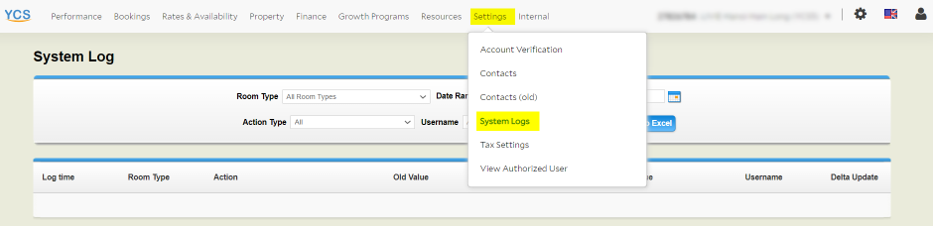
Action Type: Room Rate Category Rate
Useful information of booking pricing breakdown:
How is the total amount (booking) calculated?
Agoda does not send any invoices. We deduct the commission from the total amount paid by guests.
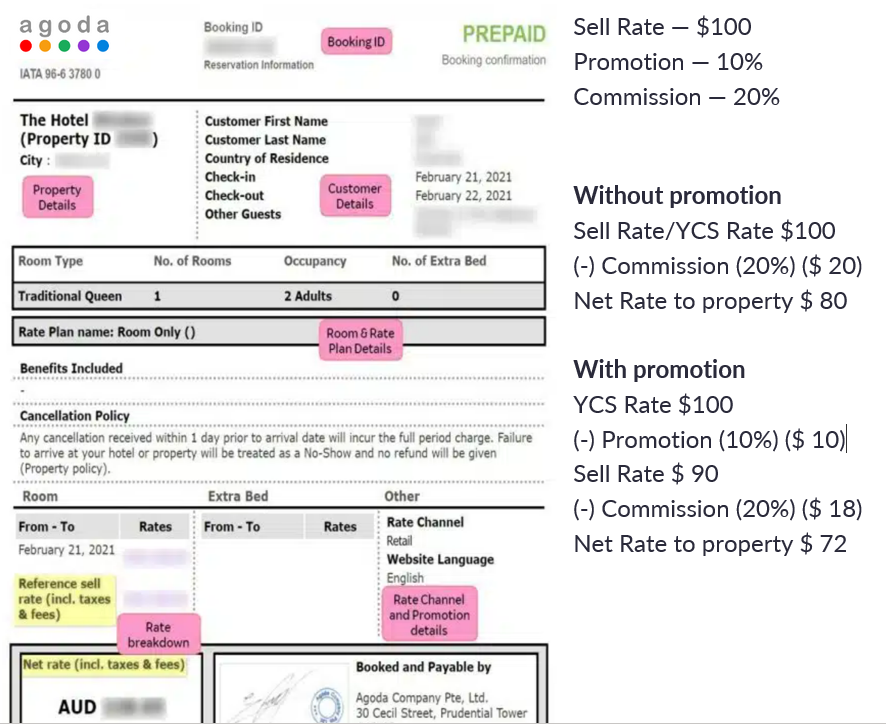
· Reference sell rate (incl. taxes & fees) = Total amount paid by the guest
· Net rate (incl. taxes & fees) = Total amount without commission
On the below screenshot is the voucher which Agoda sent to the property, you can see if there is any other discount applied (promotion, rate channel, etc) which could led into lower net rate that property should get.
For example:
For booking price dispute falling into the above scenarios, we recommend the CM to inform the property on how to perform preliminary self-checks. However, if it wasn’t due to any of the above scenarios or if the CM is unable to detect the root cause, such issues can be raised to the Technical Connectivity Support team by using this Forms to check Rate update. But if it’s for booking pricing breakdown please raised the inquiry via the Agoda Partner Portal Help Widget “Need Help?” button.
Updated 4 days ago