

OAuth Authorization
Overview
Action required for partners
OAuth 2.0 Authorization Steps
IP Whitelisting
Rate Limits and Error
Important: What Happens If You Exceed Limits?
FAQ
Overview
As part of our ongoing commitment to security enhancements, we are introducing a Token-Based Authentication (OAuth 2.0) solution for the Agoda connectivity system. This new security measure will become the standard for connecting to our Agoda Channel Manager APIs by 2026.
Please refer to roll-out timeline, and details as below.
OAuth 2.0 Authorization roll-out timeline
| Action | Timeline | Remark |
|---|---|---|
| Token-Based Authentication (OAuth 2.0) ready for YCSAPI | March 2025 | |
| Token-Based Authentication (OAuth 2.0) ready for CPAPI and PromoAPI | June 2025 | |
| Client ID and Secret Self-Service Available | June 2025 | |
| Channel Manager Development & Certification Period | Q2 2025 – Q4 2026 | During this period, both API Key authentication and Token-Based Authentication (OAuth 2.0) will be supported. |
| Cut-off for API Key Authentication | End of 2026 | After the cut-off, only Token-Based Authentication (OAuth 2.0) will be supported. API Key authentication will no longer be available. |
Action required for existing Partners
For channel managers:
Please submit your development timeline via this form. This will allow us to assist you with setup, development, testing, and certification.
If you have any questions, feel free to reach out to us >> https://developer.agoda.com/supply/docs/contact-us
OAuth 2.0 Authorization Steps
The OAuth 2.0 authentication method provides a secure and standardized way to authenticate your identity and interact with the Agoda.com Connectivity APIs. This approach involves obtaining an access token, which acts as a temporary credential for making API requests. This process enhances security by eliminating the need to share or store sensitive credentials during API interactions, making it a preferred choice for modern API integrations.
Step 1: Generate Your Client ID and Client Secret
To connect to the Agoda.com Connectivity APIs with OAuth 2.0 authentication, you need a Client ID and Client Secret. These credentials are required to authenticate your application and generate an access token.
To get your credentials, please go to API access management in YCS page and follow the instruction below.
-
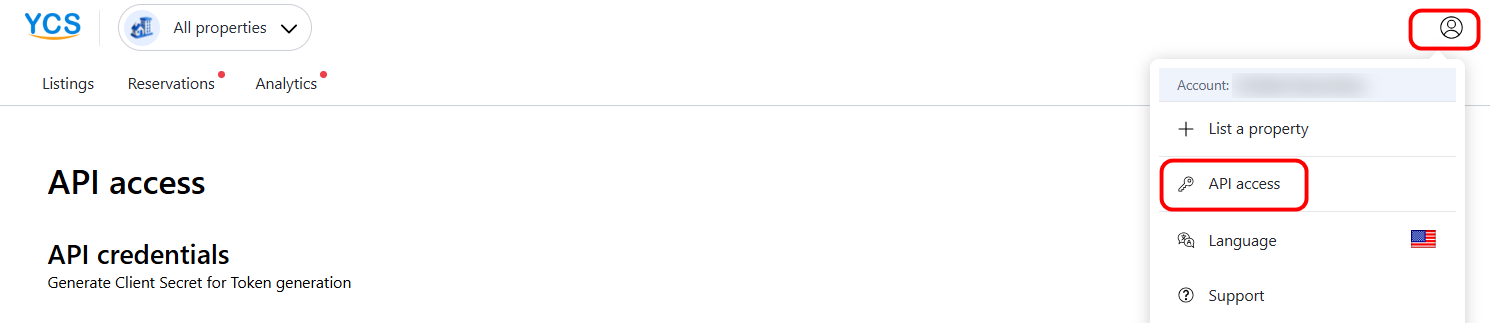
Login YCS
-
Go to the menu bar on the top right, click "API access" menu.
-
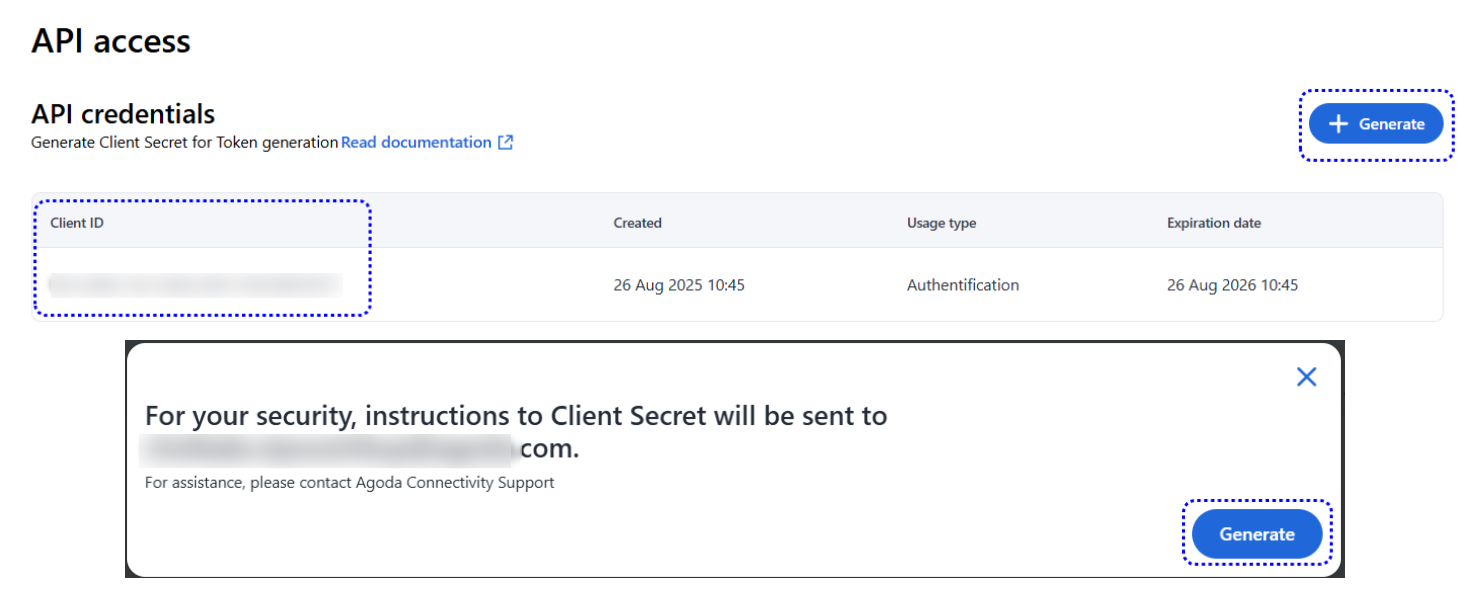
You will see Client Id, then click "Generate" to obtain Client secret
-
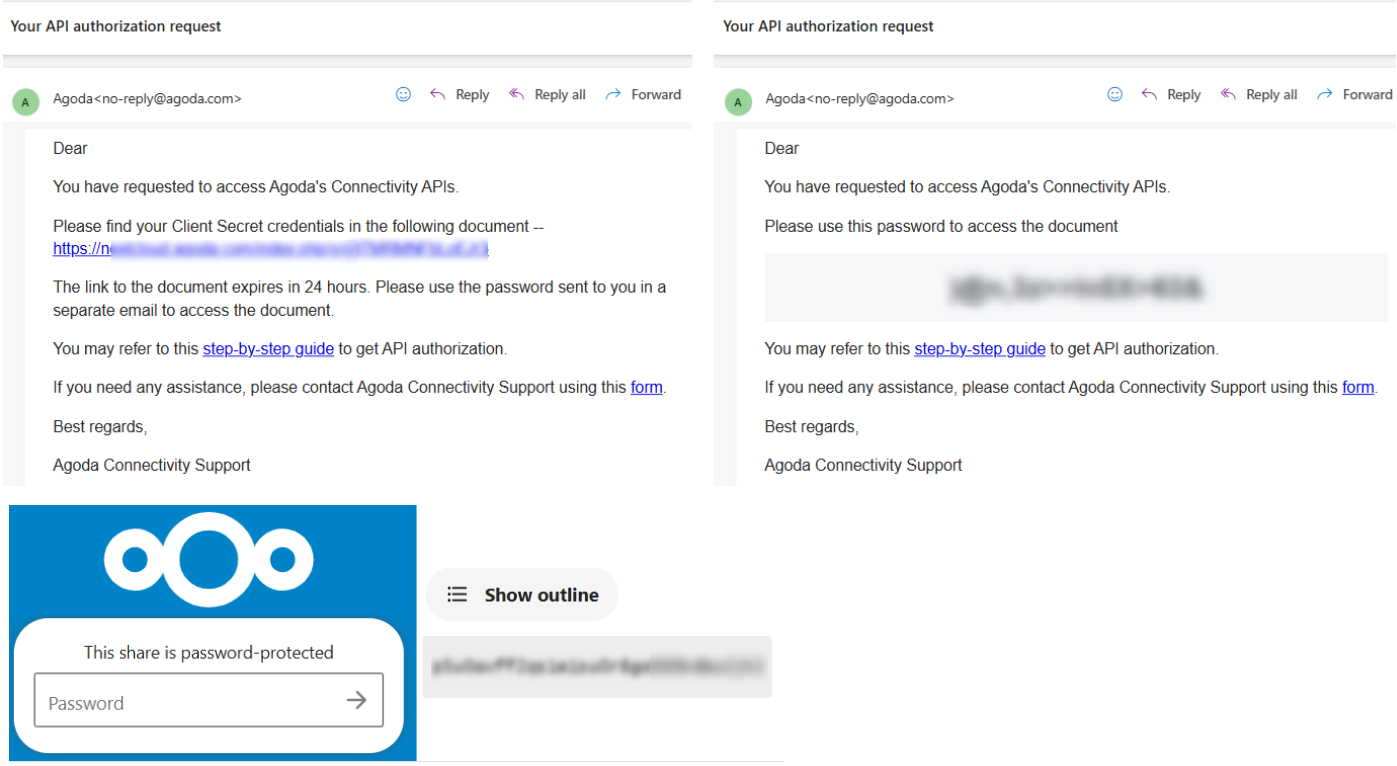
2 emails will be sent to you to obtain the Client Secret
-
Then, add IP Whitelist below.
IP Whitelisting
To authenticate your identity when connecting to Agoda, you will need to whitelist the IPs that you will be using for making API Calls, and use OAuth2.0 Authorization token when calling to Agoda APIs.
To add or update your whitelisted IP(s), please go to API access management in YCS, and add or remove your whitelisted IP(s) as needed.

Step 2: Generate an access token
To obtain an access token, you need to call the following URL endpoint:
URL ENDPOINT: https://supply.agoda.com/token-based-authentication/exchange
In your request, include your Client ID and Client Secret to authenticate your account. The endpoint will respond with an access token, which you must include in the headers of your subsequent API requests to access the Agoda.com Connectivity APIs.
Example Request 1
POST 'https://supply.agoda.com/token-based-authentication/exchange' \
--header 'Content-Type: application/json' \
--data-raw '{
 "clientId": "XXXXXXXX-XXXX-XXXX-XXXX-XXXXXXXXX",
 "clientSecret": "yourclientsecret"
}'
We also support the OAuth-standard snake_case parameter names for Client ID and Client Secret:
Example Request 2
POST 'https://supply.agoda.com/token-based-authentication/exchange' \
--header 'Content-Type: application/json' \
--data-raw '{
 "client_id": "XXXXXXXX-XXXX-XXXX-XXXX-XXXXXXXXX",
 "client_secret": "yourclientsecret"
}'
Example Successful Response
{
    "success": true,
    "responseCode": 1,
    "code": 1,
    "token": "eyJhbGciOiJIUzI1NiIsInR5cCI6IkpXVCJ9.eyJzdWIiOiIxMjM0NTY3ODkwIiwibmFtZSI6IkpvaG4gRG9lIiwiYWRtaW4iOnRydWUsImlhdCI6MTUxNjIzOTAyMn0.KMUFsIDTnFmyG3nMiGM6H9FNFUROf3wh7SmqJp-QV30",
    "downStreamServiceFailure": false
}
Example Failed Response
{
    "success": false,
    "responseCode": 60,
    "code": 20,
    "downStreamServiceFailure": false
}
Step 3: Call the Agoda.com Connectivity APIs
Once you have successfully obtained an access token, you can use it to authenticate your requests to the Agoda.com Connectivity APIs. Include the token in the Authorization header of your API calls to access the resources.
Authorization: Bearer [jwt]
!! Please also make sure that you have removed API Key URL parameter !!

Example Request
curl --location --request POST 'https://supply.agoda.com/{path}' \
--header 'Authorization: Bearer eyJhbGciOiJIUzI1NiIsInR5cCI6IkpXVCJ9.eyJzdWIiOiIxMjM0NTY3ODkwIiwibmFtZSI6IkpvaG4gRG9lIiwiYWRtaW4iOnRydWUsImlhdCI6MTUxNjIzOTAyMn0.KMUFsIDTnFmyG3nMiGM6H9FNFUROf3wh7SmqJp-QV30' \
--header 'Content-Type: application/xml' \
--data-raw '<request>
  <hotel_id>8135188</hotel_id>
</request>'
Rate Limits and Error
Rate Limits by Client ID
| Time Window | Total Attempts | Successful Calls |
|---|---|---|
| 1 Hour | 100 | 90 |
| 1 Day | 2100 | 2000 |
Rate Limits by IP Address
| Time Window | Total Attempts | Successful Calls |
|---|---|---|
| 1 Hour | 220 | 200 |
| 1 Day | 4400 | 4000 |
Definitions
- Total Attempts : Total number of API requests, regardless of outcome (success/fail).
- Successful Calls : Requests that result in a successful response (e.g., HTTP 200).
Important: What Happens If You Exceed Limits?
- Requests beyond allowed limits will be throttled or blocked.
- To prevent Rate Limit Block:
- Implement retry logic and exponential backoff.
- Monitor API usage and configure an urgent alert when usage reaches XX% of the limit.
Investigate and resolve the issue before the limit is reached and blocked to avoid service interruption. - If the 1-day limit is reached, API access will be blocked for 24 hours. During this period, no ARI updates can be processed, and the block cannot be removed or bypassed. You will need to wait until the blocking period ends before API access is restored. This may significantly impact hotel operations. Please treat rate-limit alerts as critical and take immediate action.
Rate Limit Unblock Time and Example
- The rate limiter evaluates rolling windows for the last 1 hour and the last 24 hours (grouped by category such as client_id or ip_address).
- A request is rejected when the number of calls in either rolling window exceeds its configured threshold. There is no fixed “block for N hours”. The client becomes allowed again once the count in the relevant rolling window falls below the threshold.
- Example:
Thresholds: 100 attempts per 1 hour, 2,100 attempts per 24 hours. (based on Client ID).- If a client has 110 attempts in the last 1 hour at 14:00, requests are rejected until the 1-hour rolling count falls to ≤100 (e.g., around 15:00 when older calls age out).
- If a client has 5,200 attempts in the last 24 hours at 14:00, requests are rejected until the 24-hour rolling count falls to ≤2,100 (when older calls past 24 hours drop off).
Authentication failure
The access token is valid for one hour. If you attempt to use an expired token, the API will return an HTTP 403 Forbidden status code. To avoid failed authentication attempts, ensure you refresh the token before it expires by calling the https://supply.agoda.com/token-based-authentication/exchange endpoint again with your Client ID and Client Secret.
Best Practice: Token Refresh Logic
To ensure uninterrupted API access, implement a mechanism in your application to refresh the token proactively. For example:
- Capture the current system time and store it alongside the token.
- Schedule a token refresh shortly before it expires (e.g., 5 minutes earlier).
- If an API call fails with an
HTTP 403 error, immediately refresh the token and retry the request. - Important: Please use the same token when pushing the API requests for multiple properties within the 1-hour validity window until it expires. No need to get new token for every request. Otherwise, you will be blocked.
By handling token expiration gracefully, you can maintain seamless interactions with the Agoda.com Connectivity APIs.
Response Codes
The following code is for the responseCode within the response:
| Code | Name | Description |
|---|---|---|
| 1 | Successful | The token was successfully created |
| 2 | Invalid clientId or clientSecret | The provided clientId or clientSecret was invalid The credentials provided to the token endpoint are wrong and/or the clientId or clientSecret being sent in the token request do not match what's registered. |
| 5 | User Locked | The user is locked, please contact Agoda for assistance |
| 31 | Technical Issues | Unable to generate the token, please contact Agoda for assistance |
| 33 | Unknown | Unable to generate the token, please contact Agoda for assistance |
| 41 | Request Blocked | Too many requests, please contact Agoda for assistance |
| 60 | Unauthorized Source IP | The IP that sent the request was not in Agoda's whitelist |
| 400 | Bad Request | The request sent was invalid or malformed |
| 403 | Forbidden | Using expired token. Please refresh and retry. Please refer "Authentication failure" topic above for more information. |
FAQ
Q: How can I get client secret?
- After obtaining the client ID from the API Access page in YCS, click the + Generate button.
- You will receive two emails:
- One email containing the password for the Nextcloud link
- One email containing the Nextcloud link itself
- Use the provided password to access the Nextcloud link. The client secret will be available there.
Q: I cannot access Nextcloud link.
- The Nextcloud link is valid for 24 hours from the time it is generated. Please make sure to store the client secret in your internal password manager or secrets vault.
- If you see a message that the password is incorrect or the link has expired, click the + Generate button again to obtain a new password and Nextcloud link. The previous password and link will no longer be valid.
Q: How long is the JWT Token validity period.
- Each token is valid for 1 hour. We kindly recommend regenerating the token once every hour and using the same token for all API requests within that hour. This will help reduce unnecessary token traffic and ensure that your requests remain within the allowed rate limits.
Q: When the client secret will be expired?
- The client secret is valid for 1 year after generated (your local time).
Q: I want to have parallel credentials.
- Please be informed that our system designed only one client ID per one email.
Q: How can I get new client secret if the old one expired/lost?
- You can get new client secret from the API Access page in YCS, click the + Generate button
- Once you click Generate +, the new client secret will be sent via Nextcloud link and old client secret will be immediately invalid.
Q: Does Agoda support client secret auto renewal?
- Unfortunately, Agoda does not support this feature. Please kindly manage internally to get the new client secret before the old one expired to avoid disruption to get token.
Updated 9 days ago