

FAQs
FAQ Home
Contact
Guest Policy
Room, Rate Plan Setup
Cancellation Policy
Error
Onboard
Rate Calculation
Photo
Other
Contact
How should I set the Contact Info?
Please provide "ContactProfileType="PhysicalLocation" which is used for address
<ContactInfo ContactProfileType="PhysicalLocation">

<Addresses>

            <Address Language="en-US">

              <AddressLine>213 Street Name.</AddressLine>

              <CityName>Bangkok</CityName>

              <PostalCode>10250</PostalCode>

              <CountryName>TH</CountryName>

            </Address>

          </Addresses>

</ContactInfo>
Please provide "ContactProfileType="General" which is used for user login, booking notification, and contact for Agoda
<ContactInfo ContactProfileType="PhysicalLocation">

<Names>

            <Name>

              <GivenName>John</GivenName>

              <Surname>Smith</Surname>

            </Name>

          </Names>

<Phones>

            <Phone PhoneNumber="+123456789"/>

          </Phones>

          <Emails>

            <Email>[email protected]</Email>

          </Emails>

</ContactInfo>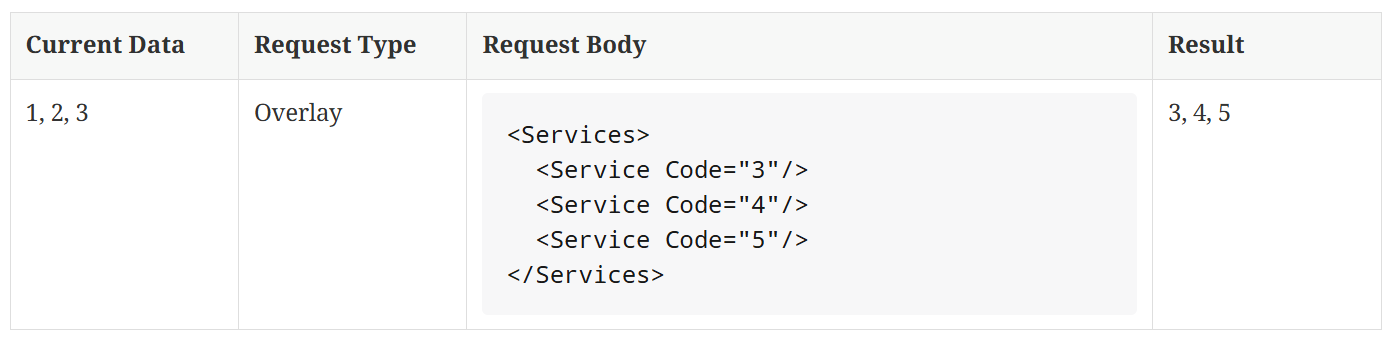
Will these email/phone number be shared with the guest?
No, we do not shared pushed email or phone with guest at the moment
Guest Policy
How can I set GuestInfo (age policy/child stay free) in the Property call?
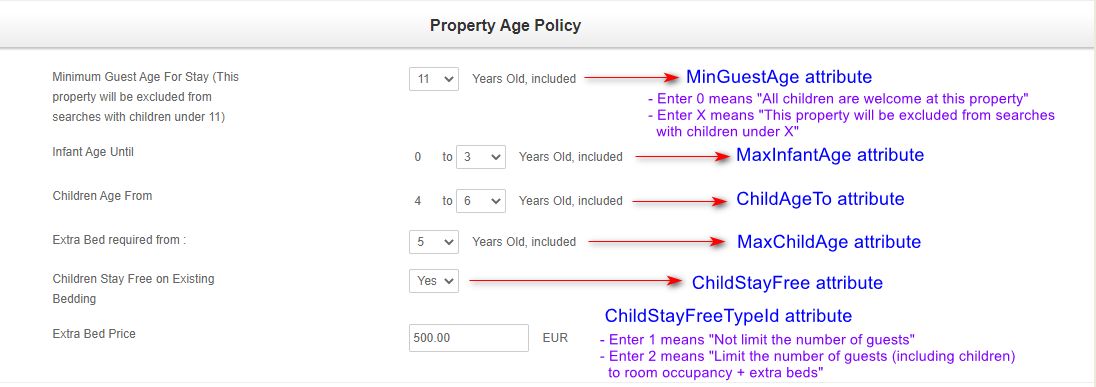
Whats the difference between child_age_to and max_child_age ?
- ChildAgeTo = we consider guest as children from this age and below.
- MaxChildAge = we will collect extra bed price from this age and above
Room, Rate Plan Setup
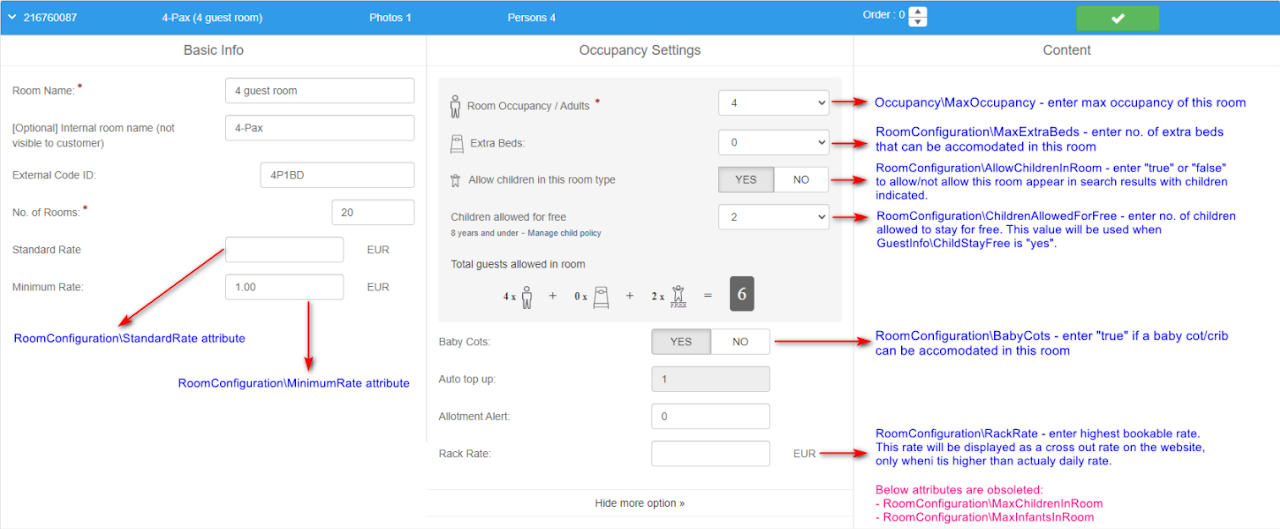
How can I set RoomConfiguration in Room call?
We pushed room creation / update with amenities and received , but some amenities are missing in Agoda Partner Portal Room Setup. Did the API fail?
No. If the API response returns , the request was successfully ingested and processed.
Some amenities may not appear in the Agoda Partner Portal Room Setup checklist because certain AmenityCodes are classified by Agoda as “All Room Type” (global) facilities and are stored at property level rather than at the individual room-type level.
Which AmenityCodes are treated as “All Room Type” (global) facilities?
In Agoda’s content processing pipeline (e.g., CPAPI/CPP), the following codes are commonly treated as global facilities. When sent via API, they may be mapped to property-level storage (e.g., hotel_all_room_facility) instead of room-level storage:
25 — Air conditioning
31 — Wireless internet
32 — LAN internet
33 — Safe box
75 — Non-smoking rooms
Why do these amenities show on Agoda Front-End (FE) but not in Agoda Partner Portal?
Because the Agoda Front-End (FE) can display amenities sourced from both property-level (global) and room-level data.
Meanwhile, Agoda Partner Portal UI checklists (Property Facilities / Room Setup) typically focus on items that are room-specific and manually toggleable per room type. To avoid duplication and conflicting overrides, global facilities inherited by all room types may be hidden in the room-level UI.
How can product (mapping room and rate) be deleted?
Product is always in overwrite mode so our system would take whatever is the latest push of that particular rate plan.
Therefore, if there's a mistake in product creation, a new request push would correct the mistake by overwriting the existing product.
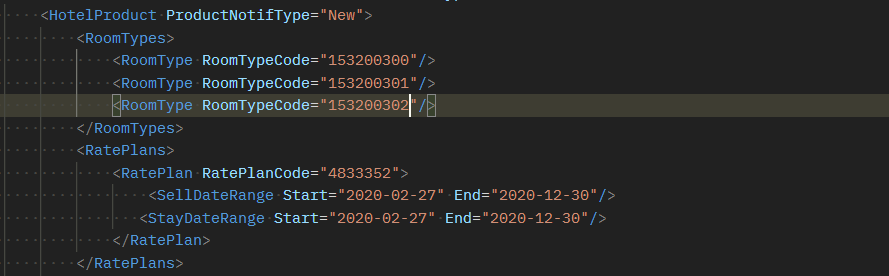
How can we link multiple rooms to one rate plan?
Product is in OVERWRITE mode by default. Please note that Rate plan is the core of the mapping.
- If multiple requests pushed for the same rate plan ID, we will take only the latest (overwrite).
- If they are different rate plan IDs, then it will not overwrite.
- In case you'd like to link multiple room type ids to one rate plan, we suggest to include multiple room type ids in the same request as per below example.
Why rate plan is inactive after created via Manage Rate endpoint?
This is expected behavior. For all rate plans created via CPAPI, the status will be inactive. To activate them, you can follow the options as per below:
- Activate via cm/rateplan/status endpoint
- Update the status manually on Agoda Partner Portal
Cancellation Policy
How can I set cancellation policy?
Please make sure you push cancellation policy to Agoda, either at the property level or hotelproduct level. Otherwise, Agoda will default the cancellation policy to “Cancel 1 day prior to arrival date, the first-night charge, No Show, the first-night charge”.
If there are cancellation policies at both level or more than one policy, Agoda will apply the strictest one.
Error
Why did I get "Authorization error" when trying to create a room or rate plan?
After you create a property, we will save the data into our database tables. There will be a delay in our system for around 5 minute before you can start pushing the room or rate plan, or sign contract.
Why did I get error code 1201 "API key is not authorized for Property id: xxx" when I try to push SetARI/SetARIv2 or GetProduct?
There will be around 1 min delay time after HotelProduct creation and ARI update.
Why did I get "Home should have 1 rate plan." error? / Why did I get "Restrictions - limit 1 room" error?
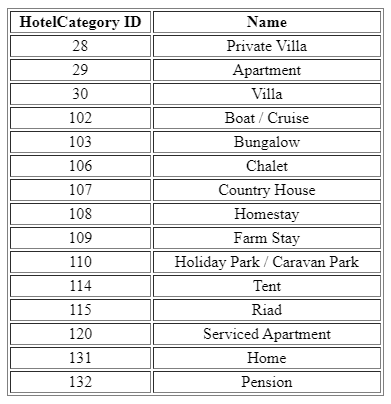
This is a validation for single unit vacation rentals (Agoda Homes) to have only 1 rate plan and 1 room type per property.
Property will be categorized as single-unit vacation rentals when:
- GuestRoomInfo->Quantity = 1
- HotelCategory is matched with one of the below:
Why do I get error when trying to push a property with certain chain ID?
Certain chain ID must be added to your API key first in our backend set up to allow property to be created with that chain ID using your API Key.
Why do I get error 'Limit exceed for creation' when it was working perfectly before?
On our backend set up, each API key has certain property allowance. This error generates only when the allowance is met. Please contact Agoda support to increase the allowance for you.
Why do I keep receiving 'hotel is already exist" error?
It is because the property is flagged as duplication with an existing property on Agoda. Below are the criteria for duplication logic.
- Non-chain: Same property name / same location (check lat/long by first 3 decimals)
- Chain: same external id within the same chain id
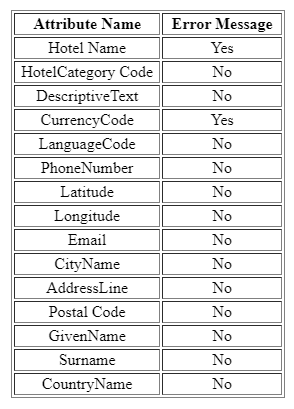
What are the list of attributes that cannot be updated via API?
There are certain attributes that cannot be updated via content push API.
Some will get an error warning that the value of the attribute cannot be updated while some will just simply be ignored.
Onboard
How to create Single Unit Non-Hotel Accommodations (NHA)?
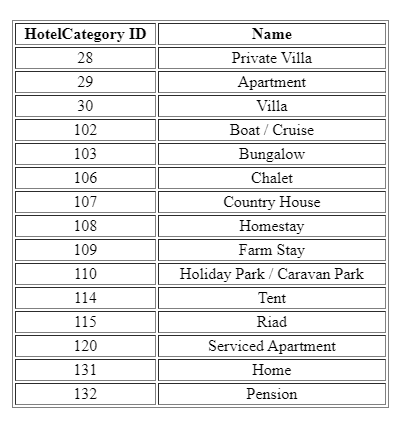
Property will be categorized as single-unit vacation rentals when:
- One room type and number of room
- One rate plan
- HotelCategory is matched with one of the below:
Will all properties under the same email account got signed/auto-lived after host/Property Manager signed via hostContractsSign call or signed in Host Manage?
In this version, the following HotelCategories will be auto-signed/live from the email account signing, regardless of room quantity:
How the Contract work?
- The contract signing from the property owner is mandatory in order to reach the fraud check step and eventual activation of the property
- If the contract is not signed, no fraud check or activation will be done.
- For inidividual property, please use hotelContractsSign call. For vacation rentals property manager who have multiple Agoda Homes properties under the same email account, please use hostContractsSign call.
- If CM does not want to implement contract signing, property owner can sign the contract in Agoda extranet (Agoda Partner Portal or Host Manage).
How can I create a test hotel and see end-to-end process?
End-to-end process is available in production environment only so we suggest you to push a test property to production in Test city. Below are coordinates and details of the Test city.
longitude = 43.029842376709
latitude = -11.5976982116699
Country code = KM
City name = Test City
How long does it take for a property to live on Agoda?
Usually it takes 24-48 hours for a property to live on Agoda by the automated flow given that all required criteria are met.
- Images > 3
- Main Image
- Contract Signed
Once these 3 criteria are met, the automation flow will submit the property to fraud check stage and when it passes fraud check, the property will be activated on Agoda.
Is there a wait-time between each request when creating a property?
Yes, we recommend 10 minutes wait-time between each creation request when pushing a new property to Agoda.
- Property Creation Request
- Room Creation Request
- Rate Plan Creation Request
- Product Creation Request
What are mandatory attributes in order to get vacation rental properties to go live?
- RentalLicense
- Direction
- HouseRule
- LocalRecommendation
Why does my properties got deleted?
Properties will be deleted if they do not go live after 60 days of initial onboarding. In order for property to go live, all required criteria must be met.
- Images > 3
- Main Image
- Contract Signed
Once these 3 criteria are met, the automation flow will submit the property to fraud check stage and when it passes fraud check, the property will be activated on Agoda.
Why I received error 9216 when creating the property?
Some countries are blocked from being onboarded as Single Unit Non‑Hotel Accommodations (sNHA) via CPAPI. To resolve, create the property as a multi-unit (mNHA) or as a supported hotel-type accommodation using the accommodation type IDs provided in the documentation.
List of accommodation type and ID for mNHA.
| Accommodation Type | ID |
|---|---|
| Hotel | 34 |
| Serviced Apartment | 120 |
| Guest House | 141 |
| Hostel | 33 |
| Resort | 37 |
| Bed and Breakfast | 135 |
| Inn | 111 |
| Motel | 35 |
| Ryokan | 38 |
| Riad | 115 |
List of countries not allowed for sNHA (Single-Unit Non Hotel Accommodation)
Click to view full list of countries (160)
| Code | Country |
|---|---|
| AF | Afghanistan |
| AG | Antigua & Barbuda |
| AI | Anguilla |
| AL | Albania |
| AM | Armenia |
| AN | Netherlands Antilles |
| AO | Angola |
| AR | Argentina |
| AS | American Samoa |
| AW | Aruba |
| AZ | Azerbaijan |
| BA | Bosnia Herzegovina |
| BB | Barbados |
| BD | Bangladesh |
| BF | Burkina Faso |
| BI | Burundi |
| BJ | Benin |
| BL | Saint Barthelemy |
| BM | Bermuda |
| BO | Bolivia |
| BQ | Bonaire, Sint Eustatius and Saba |
| BR | Brazil |
| BS | Bahamas |
| BT | Bhutan |
| BV | Bouvet Island |
| BW | Botswana |
| BY | Belarus |
| BZ | Belize |
| CA | Canada |
| CC | Cocos (Keeling) Islands |
| CD | Democratic Republic of the Congo |
| CF | Central African Republic |
| CG | Republic of Congo |
| CI | Cote D'ivoire |
| CK | Cook Islands |
| CL | Chile |
| CM | Cameroon |
| CO | Colombia |
| CR | Costa Rica |
| CU | Cuba |
| CV | Cape Verde |
| CW | Curacao |
| CX | Christmas Island |
| CY | Cyprus |
| DJ | Djibouti |
| DM | Dominica |
| DO | Dominican Republic |
| DZ | Algeria |
| EC | Ecuador |
| EE | Estonia |
| EG | Egypt |
| EH | Western Sahara |
| ER | Eritrea |
| ET | Ethiopia |
| FK | Falkland Islands |
| FM | Federated States of Micronesia |
| FO | Faroe Islands |
| GA | Gabon |
| GD | Grenada |
| GE | Georgia |
| GF | French Guiana |
| GH | Ghana |
| GM | Gambia |
| GN | Guinea |
| GP | Guadeloupe |
| GQ | Equatorial Guinea |
| GS | South Georgia Islands |
| GT | Guatemala |
| GW | Guinea-Bissau |
| GY | Guyana |
| HN | Honduras |
| HT | Haiti |
| IO | British Indian Ocean Territory |
| IQ | Iraq |
| IR | Iran |
| JM | Jamaica |
| KE | Kenya |
| KG | Kyrgyzstan |
| KI | Kiribati |
| KN | Saint Kitts And Nevis |
| KP | North Korea |
| KY | Cayman Islands |
| KZ | Kazakhstan |
| LB | Lebanon |
| LC | Saint Lucia |
| LR | Liberia |
| LS | Lesotho |
| LT | Lithuania |
| LV | Latvia |
| LY | Libya |
| MA | Morocco |
| MD | Moldova |
| ME | Montenegro |
| MF | Saint Martin (France) |
| MG | Madagascar |
| MH | Marshall Islands |
| MK | North Macedonia |
| ML | Mali |
| MN | Mongolia |
| MQ | Martinique |
| MR | Mauritania |
| MS | Montserrat |
| MW | Malawi |
| MX | Mexico |
| MZ | Mozambique |
| NA | Namibia |
| NC | New Caledonia |
| NE | Niger |
| NF | Norfolk Island |
| NG | Nigeria |
| NI | Nicaragua |
| NR | Nauru |
| NU | Niue |
| OM | Oman |
| PA | Panama |
| PE | Peru |
| PG | Papua New Guinea |
| PK | Pakistan |
| PM | Saint Pierre and Miquelon |
| PN | Pitcairn Islands |
| PR | Puerto Rico |
| PW | Palau |
| PY | Paraguay |
| RE | Reunion |
| RO | Romania |
| RS | Serbia |
| RU | Russia |
| RW | Rwanda |
| SB | Solomon Islands |
| SD | Sudan |
| SG | Singapore |
| SH | Saint Helena |
| SK | Slovakia |
| SL | Sierra Leone |
| SN | Senegal |
| SO | Somalia |
| SR | Suriname |
| SS | South Sudan |
| ST | Sao Tome and Principe |
| SV | El Salvador |
| SX | Sint Maarten (Netherlands) |
| SY | Syria |
| SZ | Eswatini |
| TC | Turks & Caicos Islands |
| TD | Chad |
| TF | French Southern and Antarctic Lands |
| TG | Togo |
| TJ | Tajikistan |
| TK | Tokelau |
| TL | Timor-Leste |
| TM | Turkmenistan |
| TN | Tunisia |
| TO | Tonga |
| TT | Trinidad & Tobago |
| TV | Tuvalu |
| TZ | Tanzania |
| UA | Ukraine |
| UG | Uganda |
| US | United States |
| UY | Uruguay |
| UZ | Uzbekistan |
| VA | Holy See (Vatican City) |
| VC | St. Vincent & Grenadines |
| VE | Venezuela |
| VG | British Virgin Islands |
| VI | U.S. Virgin Islands |
| VU | Vanuatu |
| WF | Wallis and Futuna |
| WS | Samoa |
| YE | Yemen |
| YT | Mayotte |
| YU | Yugoslavia |
| ZM | Zambia |
| ZW | Zimbabwe |
Rate Calculation
Does Agoda take commission from surcharges/fees?
Surcharges/fees created via Content API will be flagged as 'Agoda do not take commission'. However, partner can select to allow/not allow Agoda to take the commission on surcharges in our extranet. The commission would be the same % as room price.
Please visit this link for more details: <https://agodapropertypartnerhelp.zendesk.com/hc/en-us/articles/360001445708-How-do-I-manage-additional-fees-> .
How Agoda calculate the booking price?
Please refer to this article <https://agodapropertypartnerhelp.zendesk.com/hc/en-us/articles/360051821373-How-do-I-calculate-my-booking-rates->.
What is the meaning of each Fees' ChargeType?
- PGPB = Per Guest Per Booking
- PB = Per Booking
- PGPN = Per Guest Per Night
- PRPB = Per Room Per Booking
- PN = Per Night
- PAPB = Per Adult Per Booking
- PCPB = Per Child Per Booking
- PAPN = Per Adult Per Night
PCPN = Per Child Per Night
What is the meaning of each Fees' ApplyType?
M = Mandatory (Agoda Collect) where Agoda will collect the fee when the booking is made
E = External (Property Collect) where property owner will collect the fee upon arrival
Photo
Why images pushed are not processed?
Image URL must be whitelisted on Agoda first before images can be processed. Please also note that image URL must be accessible via internet browser.
In case image URL is already whitelisted, it could be server performance issue. Please contact Agoda Support to check on case-by-case basis.
How can images be updated or added?
All images including the existing ones must be included in the property request with OVERLAY or DELTA mode. Images are OVERWRITE by default, therefore, if property would like to add more images, channel manager must include existing images + new images in the request, otherwise, images would be deleted.
Image / photo requirements
- Minimum picture dimension is 800 x 600 px
- Maximum file size is 10 MB
- Supported file formats are jpeg, jpg, png
What are the requirements for image URLs submitted via Content Push API?
All image URLs must meet the following criteria:
- Must be a direct HTTPS URL
- Must be publicly accessible without authentication
- Must be stable and non-expiring
- Must not require tokens, cookies, session validation, or custom request headers
- Must not depend on temporary or time-limited access mechanisms
Agoda retrieves image content asynchronously after receiving the API request. Therefore, the image must remain accessible at the provided URL at the time of ingestion.
If the system cannot retrieve the image from the provided URL, the image will not be processed or displayed.
We pushed room images via /cm/rooms (overlay with fewer images) but the extranet still shows the old images. Did the API fail?
No. If the API returned success, the request was processed — but /cm/rooms uses DELTA (additive) image logic and will not remove existing room images. Please refer to examples below:
Example 1:
If a room already has 4 images and the request sends 2 new images, the room will end up having 6 images in total, rather than replacing the previous ones.
Example 2:
If a room has 4 images (A, B, C, D) and the request sends 2 images (A, B), there will be no change, since images A and B already exist in the system.
Result: The room will still display 4 images (A, B, C, D).
Limitation: Currently, the API does not support removing or syncing (overlaying) room-level images. If any images need to be removed, this must be done manually via the Agoda Partner Portal UI.
In summary, the Room API only supports adding or updating images, but not removing or replacing existing ones.
How can I reorder the photos?
Photo reordering is not supported via CPAPI. The display order differs between Agoda Partner Portal and the Agoda front end (customer-facing website and app). See details below.
Agoda front end display order
The photo display order on Agoda's website and app is managed automatically by Agoda's internal quality-based system and cannot be controlled via CPAPI.
Property photos
Agoda selects and orders property gallery photos based on image quality and ImageCaption:
| Position | What is shown |
|---|---|
| 1st photo (hero) | The photo designated as main via Main="true" in XML, or the highest quality photo if none is set |
| 2nd photo | Best quality from Guestroom or Bathtub or Hottub photos |
| 3rd–7th photos | Best quality photos from diverse categories (e.g. pool, lobby, beach, restaurant) |
| 8th+ photos | Remaining photos, alternating between room and property photos based on photo quality |
Room photos
Agoda selects and orders room photos based on image quality and ImageCaption:
| Position | What is shown |
|---|---|
| 1st photo | Best quality bedroom or bed photo |
| 2nd photo | Best complementary photo (e.g. balcony, kitchen, living area) |
| 3rd photo | Best bathroom photo |
| 4th+ photos | Remaining photos, sorted by quality |
Tips to improve your photo ranking:
- Upload high-resolution, well-lit photos that clearly show the room or area.
- Ensure photos are at least 1024×768 pixels — photos below this size receive a quality penalty.
- Avoid uploading bathroom photos as the primary room image.
Processing time: Photos take 2-7 days after upload to appear on the front end due to quality scoring and content processing.
Agoda Partner Portal photo display order
The order of photos shown in Agoda Partner Portal is based on the order in which images were first uploaded. Once photos have been pushed, the order cannot be changed via API.
To reorder photos in Agoda Partner Portal:
- Log in to Agoda Partner Portal and navigate to the property's photo section.
- Drag and drop photos to the desired position.
Setting a main photo:
| Level | Supported via XML? | How |
|---|---|---|
| Property-level | ✅ Yes | Use Main="true" in OTA_HotelDescriptiveContentNotifRQ |
| Room-level | ❌ No | Manual action in Agoda Partner Portal only |
For property-level, use the following format in OTA_HotelDescriptiveContentNotifRQ:
<MultimediaDescriptions>
  <MultimediaDescription>
    <ImageItems>

      <ImageItem>
        <ImageFormat Sort="1" Main="true">
          <URL>https://images.example.com/property/hero.jpg</URL>
        </ImageFormat>
        <TPA_Extensions>
          <CaptionCode>1</CaptionCode>
        </TPA_Extensions>
      </ImageItem>


      <ImageItem>
        <ImageFormat Sort="2">
          <URL>https://images.example.com/property/lobby.jpg</URL>
        </ImageFormat>
      </ImageItem>
    </ImageItems>
  </MultimediaDescription>
</MultimediaDescriptions>
Main="true" is not a valid attribute on the <Image> element OTA_HotelInvNotifRQ (room-level). Using it will return error code 9002.
Why I received a successful response for photo update request but it does not reflect on Agoda Partner Portal?
- Please make sure that you have contacted Agoda for photo URL whitelisting and allow Agoda user agent to download the photos from your system.
- For photo URL whitelisting, please contact us and provide the URLs so we can proceed with whitelisting on our side.
- For Agoda user agent, please allow the User-Agent: okhttp/* on your end and repush request.
- For other issue, please contact us here https://developer.agoda.com/supply/docs/contact-us
Other
What are the attributes that can be updated using DELTA update?
- Property Route:
- Service
- Channel
- CancelPolicy
- ChildAgeBand
- Room Route:
- AmenityCode
- Text Language
- RatePlan Route:
- ChannelCode
Transaction Time
- Transaction limit: 10 requests/second - PRODUCTION
- 1 min delay time after HotelProduct creation and ARI update -Both PRODUCTION & SANDBOX
- 1 min delay time after property creation and the next request for that specific property - Both PRODUCTION & SANDBOX
How does Delta (partial update) request work?
We do have support for a partial update for 1-many fields except for image in property, room, and rate plan requests. Normally, by sending an Overlay request, you need to send all data for the particular property, room, or rate plan. Otherwise, we will delete the information if it does not present in the request.
By sending a Delta request, we have provided the ability to ignore the particular 1-many fields if there is no change related to that field. We will only process the information by using the Status attribute.
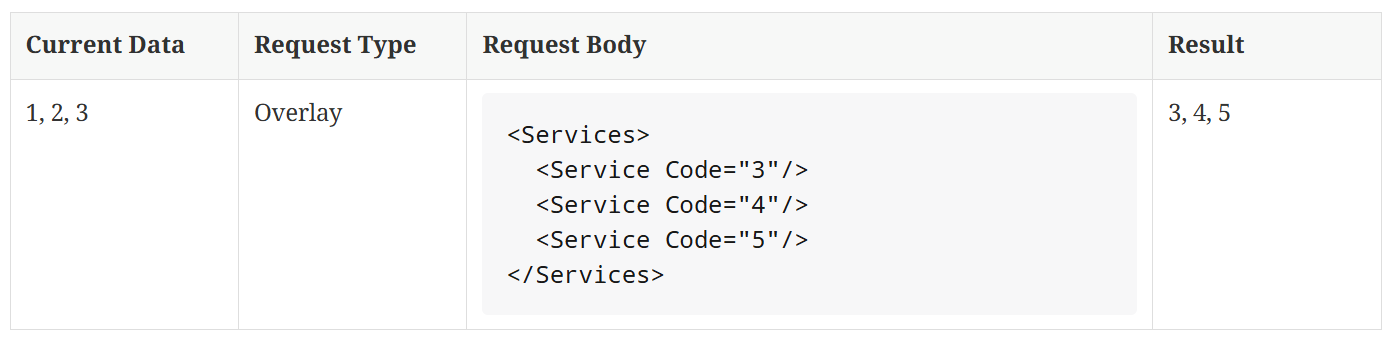
If you send the Delta request. We will process only the service that presents in the request using the Status (Active, Inactive). Let says you send a request with 4 (Active), 5 (Inactive), 6 (Active). We will add services 4, 6 and remove service 5. Service 3 will remain.
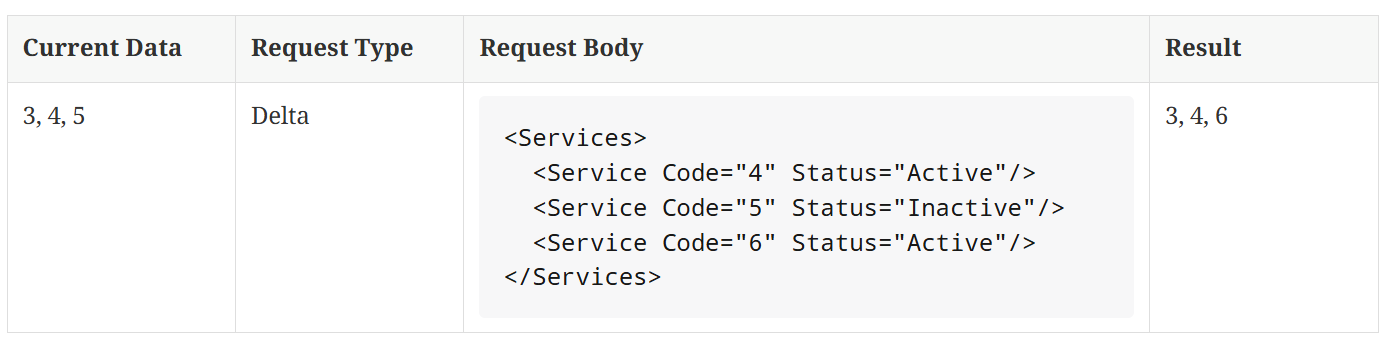
In case you send the Delta request without any service, all services of the property will be kept as it is.

For the Delta request, if any element does not have the Status attribute, we will put Active as a default.
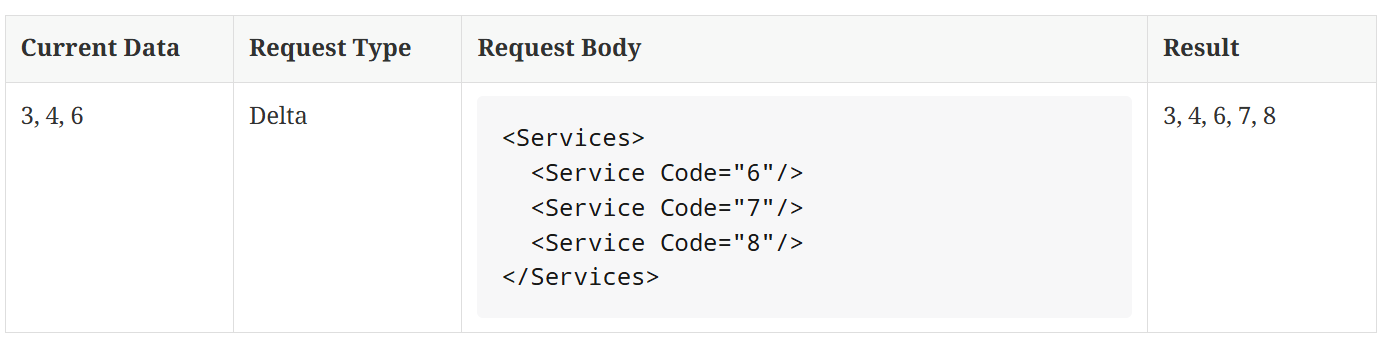
Please note the Status attribute is applicable for the Delta request only. If you send a New or Overlay request, the Status will be ignored.
Updated 4 days ago