

Fee Waiver Cancellation
Affiliate API Usage Guide: Fee Waiver Cancellation
This document provides guidance on using the Affiliate APIs for handling booking cancellations with a fee waiver.
Important Notes
Before proceeding with the API implementation and testing, please carefully review the following important notes:
- Testing Environment:
Please ensure that only the provided testing environment URL is used for testing purposes. Prior to testing, contact the Agoda Technical Manager to enable the necessary permissions. Any losses incurred from using the production environment during the testing phase will need to be absorbed and handled independently. - Responsible Use of Fee Waiver Cancellation:
The Fee Waiver Cancellation feature should be used responsibly and in alignment with the actual needs of the guest. Misuse or excessive use of this interface is strictly forbidden. - Hotel's Final Decision on Fee Waiver Cancellation:
The result of a Fee Waiver Cancellation request is subject to the final decision of the hotel. Agoda cannot guarantee that the fee waiver request will be approved.
Step 1: Call Affiliate Booking Details API
Suggest API Call Timing
This API should be called for a confirmed booking with a status of “BookingConfirmed” or “BookingCharged,” and only if the feeWaiverStatus is not currently pending, before submitting a fee waiver request
Description
The Affiliate Booking Details API provides details about the booking, including the isFeeWaiverAllowed flag, which indicates whether the booking is eligible for a fee waiver cancellation request at the time requested.
This status may change over time, so please ensure to check this flag before proceeding to Step 2.
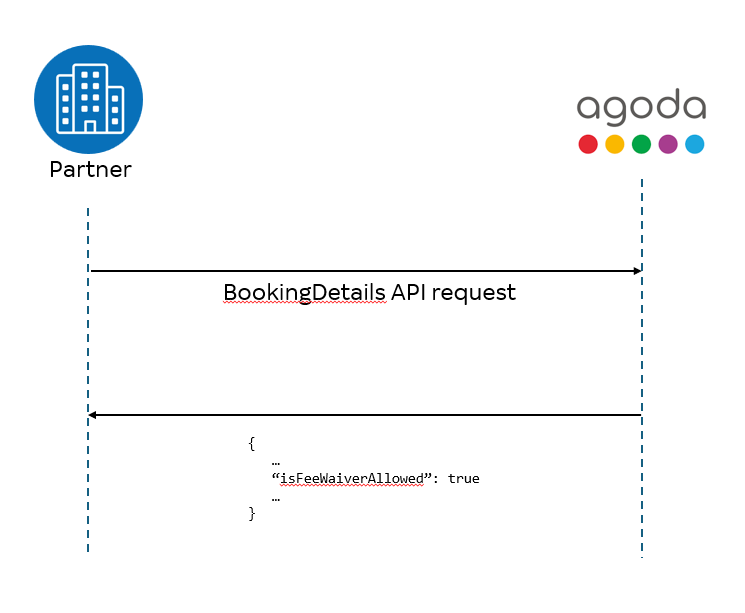
Booking Detail API - Request Example
{
    "bookingIds": [
        80000040
    ]
}
Parameters for Booking Detail Request Schema (* = Require)
Element | Attribute | Description |
|---|---|---|
Element | Attribute | Description |
| BookingDetailRequestV4 | bookingIds* array[Long] | List of Booking ids, Max: 40 Booking IDs, but recommend <=10 for best performance. |
Booking Detail API - Response Example (Correct Case)
{
  "bookings": [
    {
      "bookingId": 80000040,
      "tag": "12345667",
      "status": "BookingCharged",
      "checkIn": "2021-12-01",
      "checkOut": "2021-12-02",
      "naturalDisaster": false,
      "property": {
        "propertyName": "Kurumba Maldives",
        "country": "Maldives",
        "city": "Maldives Islands",
        "addressLine1": "Avenue Connaught Place, City Center New Delhi 110001",
        "addressLine2": ""
      },
      "amendments": [
        {
          "amendmentId": "12318131",
          "amendmendType": "DateAmendment",
          "amendmentStatus": "Confirmed",
          "amendmentDate": "2024-07-26T07:43:20.786Z"
        }
      ],
      "amendmentFeatures": [
        "DateAmendment",
        "GuestInfoAmendment",
        "SpecialRequest"
      ],
      "room": {
        "roomType": "Beachfront Deluxe Bungalows",
        "roomsBooked": 1,
        "ratePlan": "Retail",
        "rateType": "Sell"
      },
      "totalRates": [
        {
          "currency": "USD",
          "exclusive": 448.90,
          "inclusive": 551.65,
          "tax": 66.33,
          "fees": 36.42
        }
      ],
      "taxSurchargeInfo": "Included : Taxes and fees USD 87.36",
      "payment": {
        "rates": [
          {
            "currency": "USD",
            "inclusive": 551.65
          }
        ]
      },
      "agodaPromotion": false,
      "source": "Hotel",
      "supplierReference": "1",
      "cancellationPolicy": "Any cancellation received within 3 days prior to arrival date will incur the full period charge. Failure to arrive at your hotel or property will be treated as a No-Show and no refund will be given (Property policy).",
      "howToGetThere": "",
      "specialRequest": "High floor",
      "occupancy": {
        "numberOfAdults": 2,
        "numberOfChildren": 0
      },
      "isFeeWaiverAllowed": true,
      "feeWaiverStatus": "Pending",
      "bookingDate": "2024-11-26T05:42:33.000+07:00",
      "hotelConfirmationNumber": "R5180672169926001"
    }
  ]
}
New Response Parameters for fee waiver (Correct Case) (Correct case) (* = Require)
| Element | Attribute | Description |
|---|---|---|
| BookingDetailsResponseV4 > bookings | isFeeWaiverAllowed boolean | True if booking is applicable for fee waiver request. |
| BookingDetailsResponseV4 > bookings | feeWaiveStatus string | Status of the fee waiver request. Only present if the partner has requested a fee waiver at least once for this booking. If not requested, this field will be omitted from the response Refer to the step 3 for available values |
Step 2: Call Affiliate Confirm Cancel API (Fee Waiver)
Suggest API Call Timing
This API should be called when requesting a fee waiver. The booking must be eligible for a fee waiver as indicated by the Booking Detail API response in step 1.
Description
The Affiliate Confirm Cancel API allows you to submit a cancellation request with a fee waiver.
Important Note on Fee Waiver
Fee Waiver Cancellation does not require normal 2 steps flow (Cancel API -> Confirm Cancel API).
If you are requesting a fee waiver, you should directly call the Confirm Cancel API with the requestingFeeWaiver parameter set to true and related feeWaiverReason
Confirm Cancel API (Fee Waiver)- Request Example
{
  "bookingId": 80000610,
  "requestingFeeWaiver": true,
  "feeWaiverReason": 1
  "remark": "Cancel example"
}
Parameters for Confirm Cancel(Fee Waiver)Request Schema (* = Require)
Element | Attribute | Description |
|---|---|---|
Element | Attribute | Description |
ConfirmCancellationRequestV4 | bookingId* Long | Agoda booking ID. |
| requestingFeeWaiver boolean | Identification that the request is for FeeWaiver. | |
| feeWaiverReason integer | A number ID for Fee Waiver Reason. Please see below for detail of available value. | |
| remark string | Cancellation remarks. |
Fee Waiver Reason Enumerations
| Code | Description |
|---|---|
| 0 | None |
| 13 | Will book with hotel directly |
| 14 | Forced to cancel or postpone trip |
| 15 | Decided on a different hotel not offered by Agoda |
| 16 | Will book a different hotel through Agoda |
| 17 | Found lower price on internet |
| 18 | Found lower price through a local agent |
| 19 | Did not like payment terms |
| 20 | Did not like cancellation terms |
| 22 | Concerns about reliability |
| 23 | Concerns about safety |
| 25 | Booking not confirmed quickly enough |
| 44 | Natural disaster |
Confirm Cancel API (Fee Waiver)- Response Example (Correct case)
{}Parameters for Confirm Cancel (Fee Waiver) Response Schema (Correct case) (* = Require)
| Element | Attribute | Description |
|---|---|---|
| No specific fields | A successful response will return an empty structure |
Response Example (Error Case 1 - Fee waiver is not applicable)
{
   "errorMessage":{
      "id":"907",
      "message":"Invalid data: Fee Waiver is not applicable on this Booking ID"
   }
}
Response Example (Error Case 2 – Site id is not allowed to use fee waiver)
{
   "errorMessage":{
      "id":"924",
      "message":"Site ID is not allowed to use fee waiver"
   }
}
Response Example (Error Case 3 – Booking does not belong to siteid)
{
   "errorMessage":{
      "id":"907",
      "message":"Booking ID passed is invalid"
   }
}
Parameters for Confirm Cancel (Fee Waiver) Response Schema (Error case) (* = Require)
Element | Attribute | Description |
|---|---|---|
Element | Attribute | Description |
ConfirmCancellationResponseV4 -> errorMessage | id* string | Details are on Response Body Part (Appendix) |
| subId string | ||
| message string | Details are on Response Body Part (Appendix) |
Step 3: Call Affiliate Booking Details API [After Fee Waiver Requested]
Suggest API Call Timing
This API should be kept calling after requesting a fee waiver, at regular intervals (e.g., every X hours, where X depends on the partner's use case) until hotel provides the final fee waiver result.
If a definitive status ("Accept", "Reject", "Cancelled", "AutoReject") is returned, pulling can be stopped.
Partners may check the feeWaiverStatus for up to 72 hours after the request is submitted, but not beyond 12:00 AM on the check-in date.
Description
The Affiliate Booking Details API provides the feeWaiverStatus field, which indicates the current status of the fee waiver request.
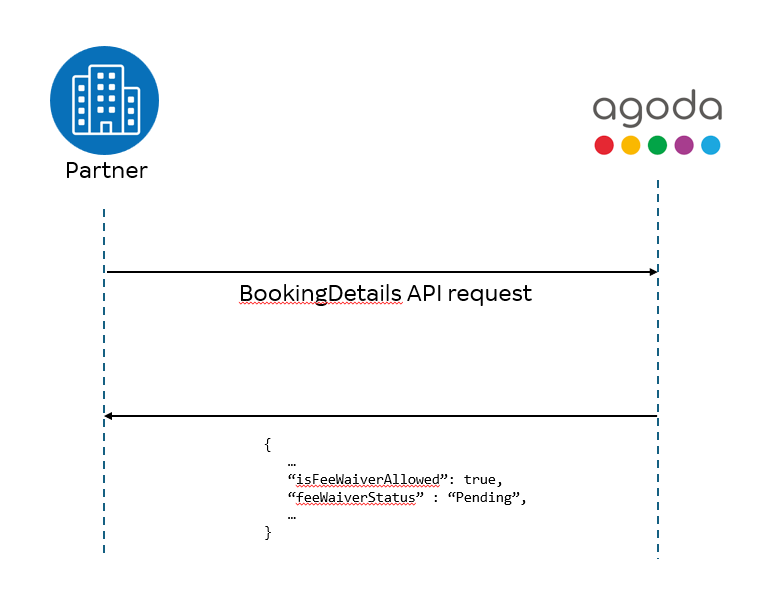
Booking Detail API - Response Example (Correct Case)
{
  "bookings": [
    {
      "bookingId": 80000040,
      "tag": "12345667",
      "status": "BookingCharged",
      "checkIn": "2021-12-01",
      "checkOut": "2021-12-02",
      "naturalDisaster": false,
      "property": {
        "propertyName": "Kurumba Maldives",
        "country": "Maldives",
        "city": "Maldives Islands",
        "addressLine1": "Avenue Connaught Place, City Center New Delhi 110001",
        "addressLine2": ""
      },
      "amendments": [
        {
          "amendmentId": "12318131",
          "amendmendType": "DateAmendment",
          "amendmentStatus": "Confirmed",
          "amendmentDate": "2024-07-26T07:43:20.786Z"
        }
      ],
      "amendmentFeatures": [
        "DateAmendment",
        "GuestInfoAmendment",
        "SpecialRequest"
      ],
      "room": {
        "roomType": "Beachfront Deluxe Bungalows",
        "roomsBooked": 1,
        "ratePlan": "Retail",
        "rateType": "Sell"
      },
      "totalRates": [
        {
          "currency": "USD",
          "exclusive": 448.90,
          "inclusive": 551.65,
          "tax": 66.33,
          "fees": 36.42
        }
      ],
      "taxSurchargeInfo": "Included : Taxes and fees USD 87.36",
      "payment": {
        "rates": [
          {
            "currency": "USD",
            "inclusive": 551.65
          }
        ]
      },
      "agodaPromotion": false,
      "source": "Hotel",
      "supplierReference": "1",
      "cancellationPolicy": "Any cancellation received within 3 days prior to arrival date will incur the full period charge. Failure to arrive at your hotel or property will be treated as a No-Show and no refund will be given (Property policy).",
      "howToGetThere": "",
      "specialRequest": "High floor",
      "occupancy": {
        "numberOfAdults": 2,
        "numberOfChildren": 0
      },
      "isFeeWaiverAllowed": true,
      "feeWaiverStatus": "Accept",
      "bookingDate": "2024-11-26T05:42:33.000+07:00",
      "hotelConfirmationNumber": "R5180672169926001"
    }
  ]
}
New Response Parameters for fee waiver (Correct Case) (Correct case) (* = Require)
| Element | Attribute | Description |
|---|---|---|
| BookingDetailsResponseV4 > bookings | isFeeWaiverAllowed boolean | True if booking is applicable for fee waiver. |
| BookingDetailsResponseV4 > bookings | feeWaiveStatus string | Status of the fee waiver request. Only present if the partner has requested a fee waiver at least once for this booking. If not requested, this field will be omitted from the response. Refer to status below for available values |
Fee Waiver Status Values
| Status | Description |
|---|---|
| Pending | The fee waiver request is under review. |
| Accept | The fee waiver request has been approved. |
| Reject | The fee waiver request has been denied. |
| Cancelled | The fee waiver request has been cancelled, not approved. |
| AutoReject | The fee waiver request was automatically rejected. |
Hotels Available for Sandbox Testing
| Hotel ID | Hotel Behavior |
|---|---|
| 11484 | Hotel immediately "Accept" the fee waiver. |
| 178562 | Hotel immediately "Reject" the fee waiver. |
| 42976 | Fee waiver is "Pending" initially, then "Accept" after 24 hours. |
Updated 3 months ago