

Best Practices & Certification Process
To achieve certification, please adhere to our policy and display the required items on your production system. Ensure you meet all necessary requirements to avoid potential delays in going live due to needed adjustments.
1. Prohibited Countries Policy
We do not operate in or have any affiliations with the following countries: Cuba, Syria, Sudan, Iran, and North Korea. Consequently, you will not find hotels from these countries in our system, and bookings from customers in these regions will be rejected.
2. Sandbox Environment
- Our sandbox servers are identical to our production servers, but any booking requests made to
will not result in actual hotel reservations or credit card charges. - Use the sandbox environment to test functionality and verify data, then re-verify in the live environment.
- The JSON request format in the sandbox is less strict than in the live environment, so minor errors might pass in the sandbox but not in production.
- All JSON requests must strictly follow the API specifications, such as using guest titles like “Mr.”, “Ms.”, “Mrs.”, or “Dr.” only.
- Test bookings will remain for 7 days, and the environment will be refreshed every Friday at 11:00 AM GMT+7.
- To enhance sandbox performance, we have defined a list of properties to cover all test cases as follows:
| Test Case | Use Case |
|---|---|
| Agoda Inventory General | For General Testing |
| Agoda inventory with surcharge(s) | Test display of mandatory and/or excluded charges such as city taxes, resort fees |
| Agoda special offer | Test and display Agoda special offer |
| Pay At Hotel with CC required | Test "Pay at Hotel" inventory that requires a credit card |
| Pay At Hotel without CC required | Test "Pay at Hotel" inventory where a credit card is not required |
| BookNowPayLater | Test "Book Now, Pay Later" inventory |
| Pomelo | Test different invoice scenario for Chinese hotels |
Sandbox supported Hotel
| Test Case | Hotel ID | Country Name |
|---|---|---|
| Agoda Inventory General | 43775 | India |
| Agoda Inventory General | 70697 | India |
| Agoda Inventory General | 178188 | India |
| Agoda Inventory General | 7947 | India |
| Agoda Inventory General | 4877 | India |
| Agoda Inventory General | 2713 | United Arab Emirates |
| Agoda Inventory General | 178523 | Japan |
| Agoda Inventory General | 6063 | Japan |
| Agoda Inventory General | 240568 | Japan |
| Agoda Inventory General | 234458 | Japan |
| Agoda Inventory General | 267121 | Japan |
| Agoda Inventory General | 1193699 | South Korea |
| Agoda Inventory General | 9412311 | South Korea |
| Agoda Inventory General | 6852414 | South Korea |
| Agoda Inventory General | 61912 | China |
| Agoda Inventory General | 9356029 | China |
| Agoda Inventory General | 9107 | China |
| Agoda Inventory General | 90772 | Hong Kong SAR, China |
| Agoda Inventory General | 263253 | Macau SAR, China |
| Agoda Inventory General | 4521 | Greece |
| Agoda Inventory General | 118508 | Hungary |
| Agoda Inventory General | 11484 | Italy |
| Agoda Inventory General | 2256959 | Singapore |
| Agoda Inventory General | 1144272 | United States |
| Agoda Inventory General | 2937 | United States |
| Agoda Inventory With Surcharge(s) | 12157 | Maldives |
| Agoda Inventory With Surcharge(s) | 12153 | Maldives |
| Agoda Inventory With Surcharge(s) | 446690 | Japan |
| Agoda Special Offer | 816878 | India |
| Agoda Special Offer | 281399 | India |
| Agoda Special Offer | 1156945 | India |
| Agoda Special Offer | 161804 | Japan |
| Agoda Special Offer | 1899389 | Japan |
| Agoda Special Offer | 9358 | Japan |
| Agoda Special Offer | 237751 | Japan |
| Agoda Special Offer | 46120338 | Japan |
| Agoda Special Offer | 478188 | Japan |
| Agoda Special Offer | 59662949 | Japan |
| Agoda Special Offer | 10953850 | Japan |
| Agoda Special Offer | 23128257 | Japan |
| Agoda Special Offer | 393768 | China |
| Agoda Special Offer | 178623 | China |
| Agoda Special Offer | 69037 | China |
| Agoda Special Offer | 10580 | Singapore |
| Agoda Special Offer | 10627 | Singapore |
| Pay At Hotel With CC Required | 1144275 | United States |
| Pay At Hotel With CC Required | 64109 | France |
| Pay At Hotel With CC Required | 5198645 | South Korea |
| Pay At Hotel With CC Required | 675525 | South Korea |
| Pay At Hotel With CC Required | 1637269 | Japan |
| Pay At Hotel With CC Required | 97512 | Japan |
| Pay At Hotel Without CC Required | 281804 | Indonisia |
| Book Now Pay Later | 73130 | India |
| Book Now Pay Later | 305514 | India |
| Book Now Pay Later | 5946705 | Japan |
| Book Now Pay Later | 6942282 | Japan |
| Book Now Pay Later | 3541400 | South Korea |
| Book Now Pay Later | 2205026 | South Korea |
| Book Now Pay Later | 23172138 | China |
| Book Now Pay Later | 53818711 | China |
| Pomelo 1.0 | 6139 | China |
| Pomelo 1.0 | 70299 | China |
| Pomelo 2.0 | 782709 | China |
3. Environment Setup
- In an HTTPS POST request, the Authentication is mandatory for all APIs. If omitted, the API will return the error messages as mentioned in Authentication setup.
- For security, to comply with the PCI Security Industry Standard, all partners must ensure that TLS v1.2 is used by their production systems.
- To maintain high-quality service on our APIs, partners should set a time-to-live (TTL) of ≤5 minutes on DNS servers and applications connecting to Agoda API URLs. This allows Agoda to quickly switch to another data center if one becomes unavailable.
- To save bandwidth and speed up your site, we recommend enabling compression in header like gzip as Accept-Encoding.
- To test curl installation, use the Curl Command, a tool to check if your request can reach the Agoda application gateway. This command can be run on Windows, Linux, or Unix.
- For application timeout settings, set a 30-second timeout for all API calls, except for Precheck (60 seconds) and Booking API (120 seconds).
- All booking and post booking related APIs has IP whitelist, please provide the latest full IP list to agoda technical manager at least 1 week before you start to use them. If IP is not whitelisted, error message will be returned as "Client ip is not valid".
4. Mandatory Hotel Content
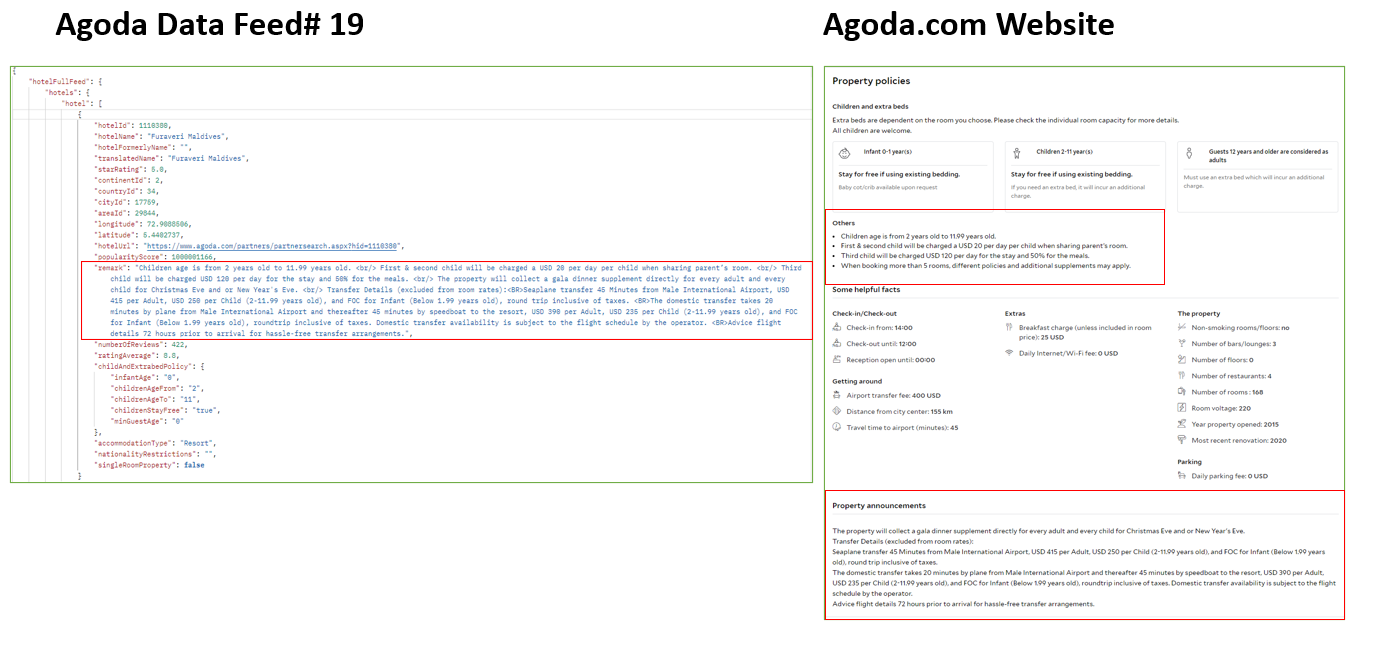
- Hotel Remark
A ‘notice’ to customers if there are particular events or situations happening at a hotel. This information can be pulled from Data Feed # 19.
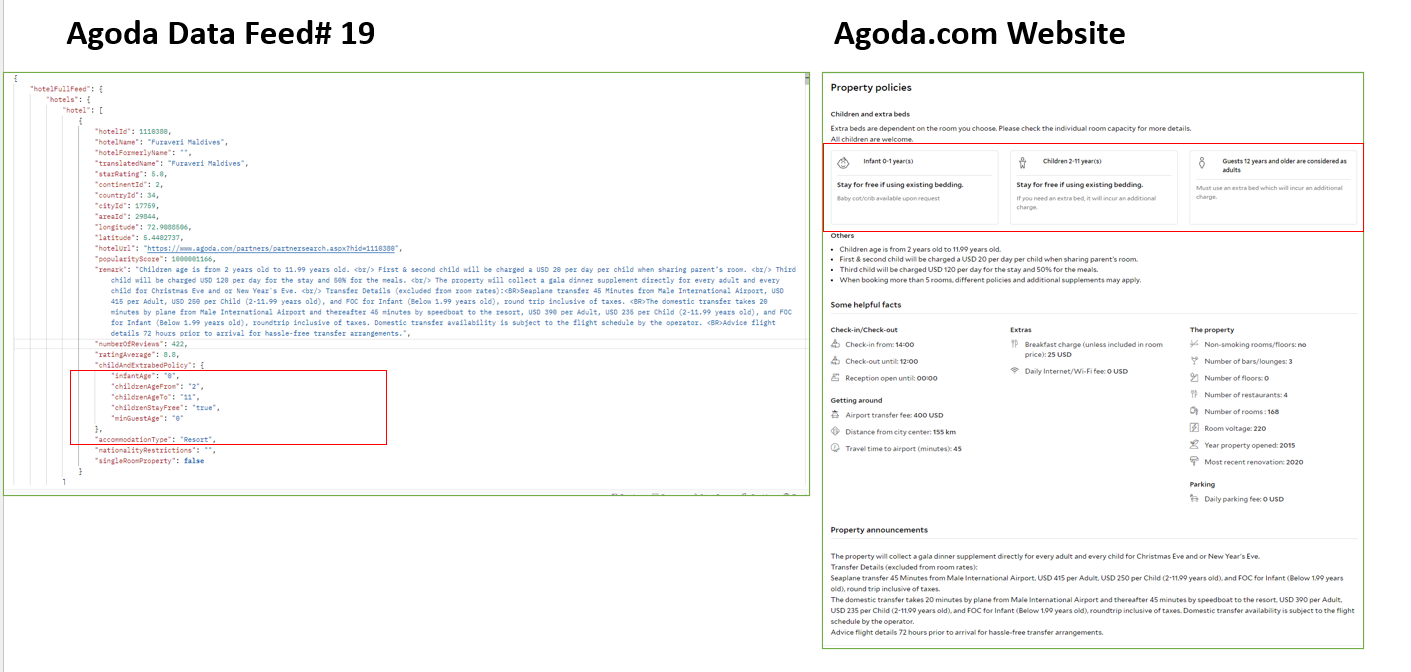
- Child and Extra beds policy
A ‘notice’ to customers if there are any additional costs for extra beds and what age to define children.- Infant age range is “infantAge” to “childrenAgeFrom”-1.
- Child age range is “childrenAgeFrom” to “childrenAgeTo”.
- For “childrenStayFree”=”true” case, it is only for content reference which doesn’t include any additional meals and extra beds.
5. Search API
-
Hotellist search Supports maximum 100 hotels per request. Please refer to “ratesPerProperty” for details. (all search requests can be sent in parallel)
-
Search criteria
- Maximum of "rooms":20
- Maximum of "adults":36
- Maximum of "children":35
- Default maximum length of stay is 90 days
If partners have a long stay booking demand >14 days, please contact your agoda representative for further discussion. - Check-in and Check-out date must be within 1 year
-
Children are NOT allowed to stay at a hotel unless adults accompany them, then number of "adults" must be “greater or equal to” number of "rooms"
-
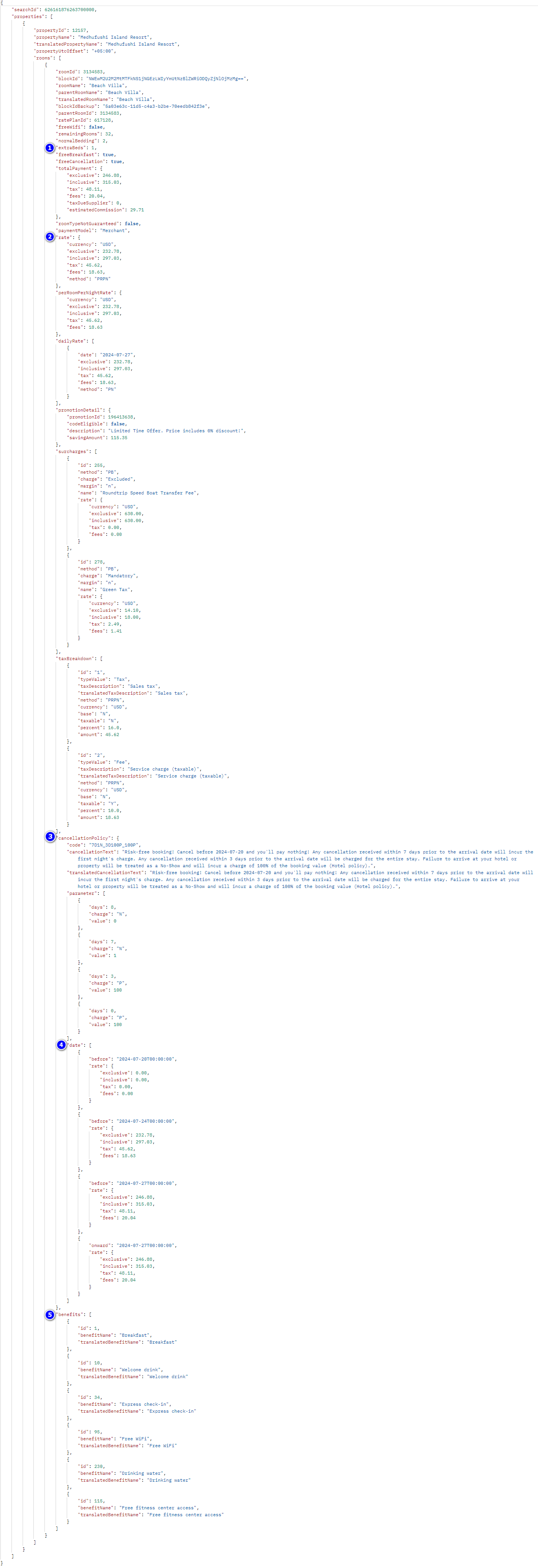
Important information from Search response API:
- Extra bed available or not under "extraBeds" tag
- The Inclusive attribute inside the Rate element is per room per night rate at default
- Cancellation policy indicated under "cancellationPolicy"
- Cancellation is based on property time zone.
- Meal plans mentioned for each room under "benefits"
- Benefit full list with name and id can be got from Content Feed API – Feed 22 Benefits
- If there are both meal related beneifts like "Breakfast" and "Breakfast for 2", please design the logic to use the stricter meal quantity.
Benefit Category Sample How to define quantities Breakfast without specific quantities, please refer to normal bedding field. 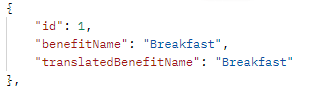

[normalBedding] breakfasts per room per nightIn this case, 2 breakfasts per room per night Breakfast with specific quantities 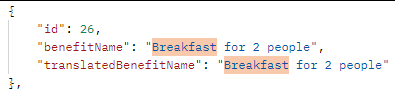
2 breakfasts per room per night, in this case this explicit value overrides the #1 scenario Breakfast with structured quantities 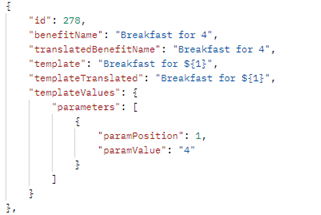
$1 breakfast per room per night
In this case, 4 breakfast per room per night
6. Excluded Surcharges
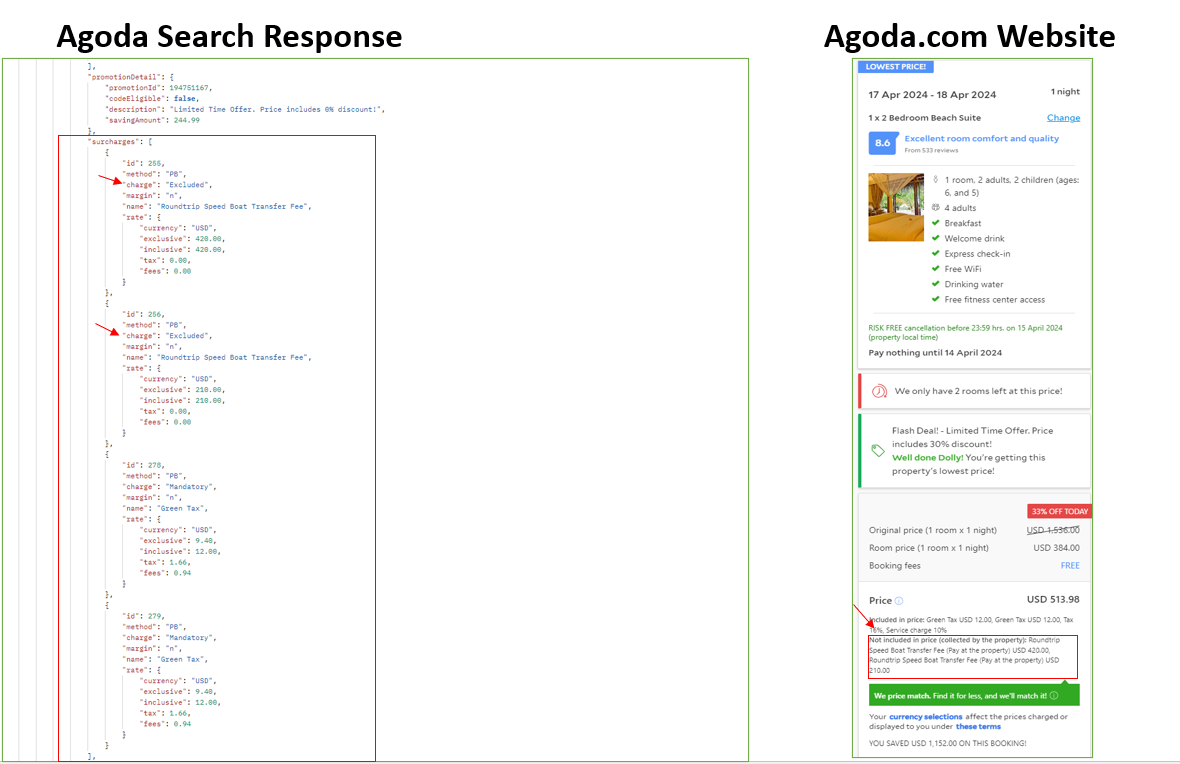
Excluded Surcharges are charges that must be paid directly to the hotel by the customer, and must be shown to customers before booking so that they can prepare for extra charges at check-in.
7. Book API
- AllowDuplication
- If primary guest name and hotel are identical and any dates of the period of stay overlap, system will consider the booking as duplicated.
- True=> API will disregard booking duplication validation and allow to process booking
- False=> API will check booking duplication and return error without creating booking (default)
- We suggest partner build the logic in your system to capture& block the real duplicate booking and pass allowDuplication=true to us.
- Tag
- The tag attribute can be partner’s reference number like partner's unique booking ID
- Maximum length 50 characters
- The following values must be in-sync throughout the booking flow (Search / Precheck / Book APIs)
- Check In
- Check Out
- User Country
- Currency
- Language
- No. of rooms
- No. of Adults
- No. of Children
- Children's Ages (to be passed only when no. of children > 0)
- If any surcharge returned in the Search API, same must be passed in the Precheck & Book API as well
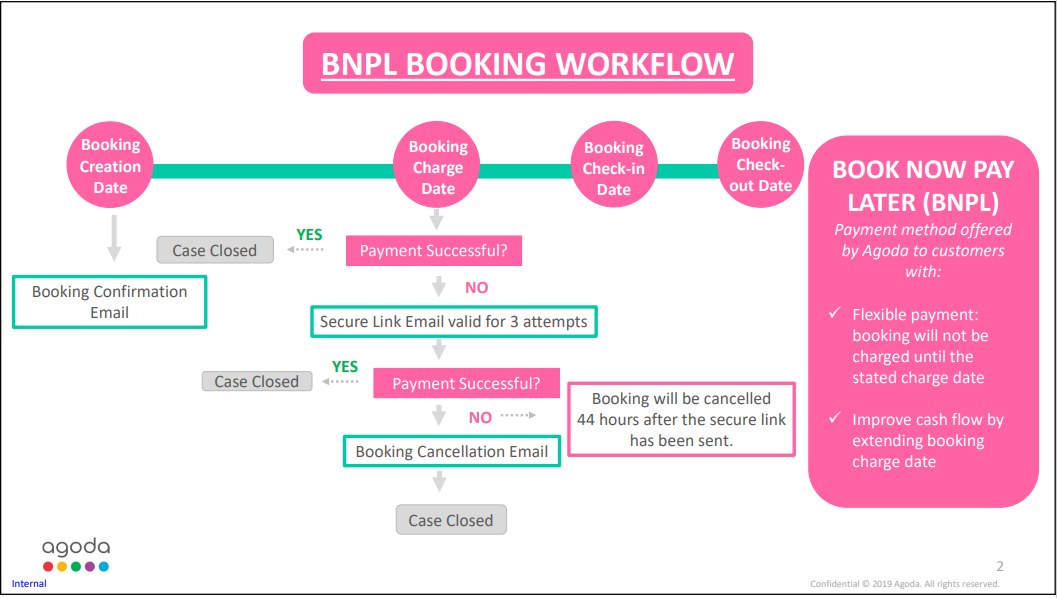
CLICK HERE to download the Book Now Pay Later (BNPL) Introduction.
See the image below for a preview of the Book Now Pay Later (BNPL) Introduction file:
8. Booking Confirmation Flow
Agoda highly recommends implementing the booking confirmation flow to minimize post-booking check-in issues.
After sending a booking request, wait up to 120 seconds (booking cutoff time). Agoda will try to reserve the allotment(s) and confirm the booking. Processing time varies due to several factors.
- When partners receive Agoda BookingID and itineraryID with “processing”=”false”from Book API, the booking is considered confirmed.
- For timeout bookings due to network or server issue, use “tag” field calling Booking ListAPI at least 10 mins. If no booking returned, can take it as booking failure.
- For processing bookings, use Agoda BookingID calling Booking DetailsAPI at least 30 mins. If booking status is still not as “BookingConfirmed” or “BookingCharged”, then reach to Agoda Customer Service team for manual check.
Some partners may want to include calling BookingList API/Bookingdetails API in the confirmation flow. Discuss this with your Agoda Technical Account Manager before going live.
9. Multiple different room types
Agoda does NOT support booking multiple different room types (e.g., Room1 = Superior and Room2 = Deluxe). Only multiple rooms of the same type are supported.
10. BookingList API
BookingList API supports up to 1,000 booking IDs.
11. BookingDetail API
BookingDetail API supports up to 40 booking IDs. Set a wait time of 30 seconds with a minimum of 3 retries in case of timeout.
12. Cancel a booking
To cancel a booking, complete two steps:
- Cancellation API and ConfirmCancellation API. BookingID, Reference, and RefundRateInclusive must match to proceed.
- ConfirmCancellationAPI can proceed after receiving the cancellation response.
- Please be aware that any cancellation happen after checkin date 00:00 AM in hotel local timezone should be handled by reaching to Agoda Customer Service. ConfirmCancellation API will return related errors in this case.
13. Child and Extra beds policy
Notify customers of any additional costs for extra beds and the age definition for children.
- If a child stays on existing bedding (free of charge), room benefits are not provided. Customers will pay additional charges directly to the hotel, e.g., for breakfast.
14. Special Request
There are two ways to submit special requests:
- Include 'SpecialRequest' in Book API.
- Submit separately via Special Request API, waiting 30 seconds after receiving the booking ID.
Certification Process
The certification process ensures your integration is fully prepared to serve customers on your live production servers. You must pass certification and receive approval from us before your application can go live and handle bookings.
Criteria:
- Hotel Database: Ensure hotels and room information are correctly mapped and regularly updated.
- Special Hotel Content: Display any hotel remarks clearly to users.
- Searching: Implement hotel list search properly and capture search results accurately.
- Booking: Calculate the total price correctly, and prominently display any excluded surcharges.
- Booking Status: Implement and handle the booking confirmation flow correctly.
- Cancellation: Implement the two-step cancellation process and ensure bookings can be successfully canceled.
- Reporting: Retrieve booking reports using the BookingList and BookingDetail APIs.
- Customer Voucher: Please check more details in Post Booking API - Retrieve Bookings for hotel confirmation number guideline.
Agoda Self-Service Portal
We offer a self-service portal for partners to manage and modify their bookings online. Through this portal, you can update booking information, check booking status, and handle changes efficiently—all in one place.
If you would like access to the self-service portal, please contact your technical account manager directly. Our team will assist you with the onboarding process and answer any questions you may have.
Updated 5 months ago