

4.4. Managing Rooms
POST /cm/rooms
Description
Build new or modify rooms for properties which are authorized under your API credentials
Body parameter
List of rooms in OTA2017B format which need to be created
Name : body
Flags : _required
_Type : OTA_HotelInvNotifRQ
Responses
| HTTP Code | Description | Schema |
|---|---|---|
| 200 | The request has been accepted for processing | OTA_HotelInvNotifRS |
| 400 | The request content was malformed | OTA_HotelInvNotifRS |
| 401 | The supplier was unauthorized | OTA_HotelInvNotifRS |
Consumes
application/xml
Produces
application/xml
Tags
- Rooms
| Type | Name |
|---|---|
| apiKey | apiKey |
Example HTTP request
Request path
/cm/rooms
Request for create property’s room
<?xml version="1.0" encoding="UTF-8"?>
<OTA_HotelInvNotifRQ xmlns="http://www.opentravel.org/OTA/2003/05" xmlns:xsi="http://www.w3.org/2001/XMLSchema-instance" xsi:schemaLocation="http://www.opentravel.org/2017B/OTA_HotelInvNotifRQ.xsd">
  <SellableProducts HotelCode="203088984">
    <SellableProduct InvNotifType="New">
      <Description>
        <Text>Beachfront</Text>
      </Description>
      <GuestRoom>
        <Occupancy MaxOccupancy="2"/>
        <Room NumberOfBathroom="1" NumberOfBedroom="1" RoomID="Room898" RoomViewCode="2" SizeMeasurement="30"/>
        <Amenities>
          <Amenity AmenityCode="25"/>
          <Amenity AmenityCode="26"/>
        </Amenities>
        <Description Language="en-US">
          <Text Language="en-US">Beach Front Rooms are 30 sqm with sea views. Saikaew Beach Resort provides all rooms, designed to offer you easy living by the sea among natural beauty, therefore, large windows in each room allow you to admire tropical garden or the beach right from your bed.</Text>
          <Image CaptionCode="1">https://images.sample.com/room/room-image-1.jpeg</Image>
        </Description>
        <TPA_Extensions>
          <RoomConfiguration AllowChildrenInRoom="true" BabyCots="true" ChildrenAllowedForFree="2" MaxExtraBeds="2" MaxInfantsInRoom="1" MaxAdultsOccupancy="2" MaxChildrenOccupancy="2" MaximumRate="500.0" MinimumRate="100.0" RackRate="400.0" StandardRate="400.0"/>
          <SubRooms>
            <SubRoom RoomType="BedRoom">
              <Amenities>
                <Amenity AmenityCode="10" Value="1"/>
              </Amenities>
            </SubRoom>
            <SubRoom RoomType="LivingRoom">
              <Amenities>
                <Amenity AmenityCode="1" Value="1"/>
                <Amenity AmenityCode="2" Value="1"/>
              </Amenities>
            </SubRoom>
          </SubRooms>
        </TPA_Extensions>
      </GuestRoom>
    </SellableProduct>
  </SellableProducts>
</OTA_HotelInvNotifRQ>
Request for partial update property’s room
<?xml version="1.0" encoding="UTF-8"?>
<OTA_HotelInvNotifRQ xmlns="http://www.opentravel.org/OTA/2003/05" xmlns:xsi="http://www.w3.org/2001/XMLSchema-instance" xsi:schemaLocation="http://www.opentravel.org/2017B/OTA_HotelInvNotifRQ.xsd">
  <SellableProducts HotelCode="203088984">
    <SellableProduct InvCode="1201474686" InvNotifType="Delta">
      <Description>
        <Text>Beachfront</Text>
      </Description>
      <GuestRoom>
        <Occupancy MaxOccupancy="2"/>
        <Room NumberOfBathroom="2" NumberOfBedroom="1" RoomViewCode="2" SizeMeasurement="30"/>
        <Amenities>
          <Amenity AmenityCode="25" Status="Active"/>
          <Amenity AmenityCode="26" Status="Active"/>
          <Amenity AmenityCode="87" Status="Inactive"/>
        </Amenities>
        <Description Language="en-US">
          <Text Language="en-US" Status="Active">Example room description in English</Text>
          <Text Language="ja-JP" Status="Inactive">Example room description in Japanese</Text>
          <Image CaptionCode="1">https://images.sample.com/room/room-image-1.jpeg</Image>
        </Description>
        <TPA_Extensions>
          <RoomConfiguration AllowChildrenInRoom="true" BabyCots="true" ChildrenAllowedForFree="2" MaxExtraBeds="2" MaxInfantsInRoom="1" MaxAdultsOccupancy="2" MaxChildrenOccupancy="2" MaximumRate="500.0" MinimumRate="100.0" RackRate="500.0" StandardRate="400.0"/>
          <SubRooms>
            <SubRoom RoomType="BedRoom">
              <Amenities>
                <Amenity AmenityCode="5" Value="1"/>
                <Amenity AmenityCode="10" Value="1"/>
              </Amenities>
            </SubRoom>
            <SubRoom RoomType="LivingRoom">
              <Amenities>
                <Amenity AmenityCode="1" Value="1"/>
                <Amenity AmenityCode="2" Value="1"/>
                <Amenity AmenityCode="3" Value="1"/>
              </Amenities>
            </SubRoom>
          </SubRooms>
        </TPA_Extensions>
      </GuestRoom>
    </SellableProduct>
  </SellableProducts>
</OTA_HotelInvNotifRQ>
Request for update property’s room
<?xml version="1.0" encoding="UTF-8"?>
<OTA_HotelInvNotifRQ xmlns="http://www.opentravel.org/OTA/2003/05" xmlns:xsi="http://www.w3.org/2001/XMLSchema-instance" xsi:schemaLocation="http://www.opentravel.org/2017B/OTA_HotelInvNotifRQ.xsd">
  <SellableProducts HotelCode="203088984">
    <SellableProduct InvCode="1201474686" InvNotifType="Overlay">
      <Description>
        <Text>Beachfront</Text>
      </Description>
      <GuestRoom>
        <Occupancy MaxOccupancy="2"/>
        <Room NumberOfBathroom="2" NumberOfBedroom="1" RoomViewCode="2" SizeMeasurement="30"/>
        <Amenities>
          <Amenity AmenityCode="25"/>
          <Amenity AmenityCode="26"/>
          <Amenity AmenityCode="87"/>
        </Amenities>
        <Description Language="en-US">
          <Text Language="en-US">Beach Front Rooms are 30 sqm with sea views. Saikaew Beach Resort provides all rooms, designed to offer you easy living by the sea among natural beauty, therefore, large windows in each room allow you to admire tropical garden or the beach right from your bed.</Text>
          <Image CaptionCode="1">https://images.sample.com/room/room-image-1.jpeg</Image>
        </Description>
        <TPA_Extensions>
          <RoomConfiguration AllowChildrenInRoom="true" BabyCots="true" ChildrenAllowedForFree="2" MaxExtraBeds="2" MaxInfantsInRoom="1" MaxAdultsOccupancy="2" MaxChildrenOccupancy="2" MaximumRate="500.0" MinimumRate="100.0" RackRate="500.0" StandardRate="400.0"/>
          <SubRooms>
            <SubRoom RoomType="BedRoom">
              <Amenities>
                <Amenity AmenityCode="5" Value="1"/>
                <Amenity AmenityCode="10" Value="1"/>
              </Amenities>
            </SubRoom>
            <SubRoom RoomType="LivingRoom">
              <Amenities>
                <Amenity AmenityCode="1" Value="1"/>
                <Amenity AmenityCode="2" Value="1"/>
                <Amenity AmenityCode="3" Value="1"/>
              </Amenities>
            </SubRoom>
          </SubRooms>
        </TPA_Extensions>
      </GuestRoom>
    </SellableProduct>
  </SellableProducts>
</OTA_HotelInvNotifRQ>
Example HTTP response
Response 200
<?xml version="1.0" encoding="UTF-8"?>
<OTA_HotelInvNotifRS CorrelationID="8b417d6a-f3df-4d65-870c-240378b8ad3e">
  <Success/>
  <InventoryCrossRefs>
    <InventoryCrossRef RequestInvCode="Room898" ResponseInvCode="101"/>
  </InventoryCrossRefs>
</OTA_HotelInvNotifRS>
Response 400
<OTA_HotelInvNotifRS CorrelationID="325d8000-48cf-11ea-9337-8950898f7d75">
  <Errors>
    <Error Code="321" ShortText="Required field missing" Status="NotProcessed"/>
  </Errors>
</OTA_HotelInvNotifRS>
Response 401
<OTA_HotelInvNotifRS CorrelationID="325d8000-48cf-11ea-9337-8950898f7d75">
  <Errors>
    <Error Code="497" ShortText="Authorization error" Status="NotProcessed"/>
  </Errors>
</OTA_HotelInvNotifRS>
Current Limitation & Advanced Bedding Configurations
Bed Configuration Set Up - Standard Setup
To set a bedroom with 1 Queen Bed and 2 Single Beds, input the SubRoom element as follows:
<TPA_Extensions>
    <SubRooms>
        <SubRoom RoomType="BedRoom">
            <Amenities>
                <Amenity AmenityCode="5" Value="1" />
                <Amenity AmenityCode="2" Value="2" />
            </Amenities>
        </SubRoom>
    </SubRooms>
</TPA_Extensions>
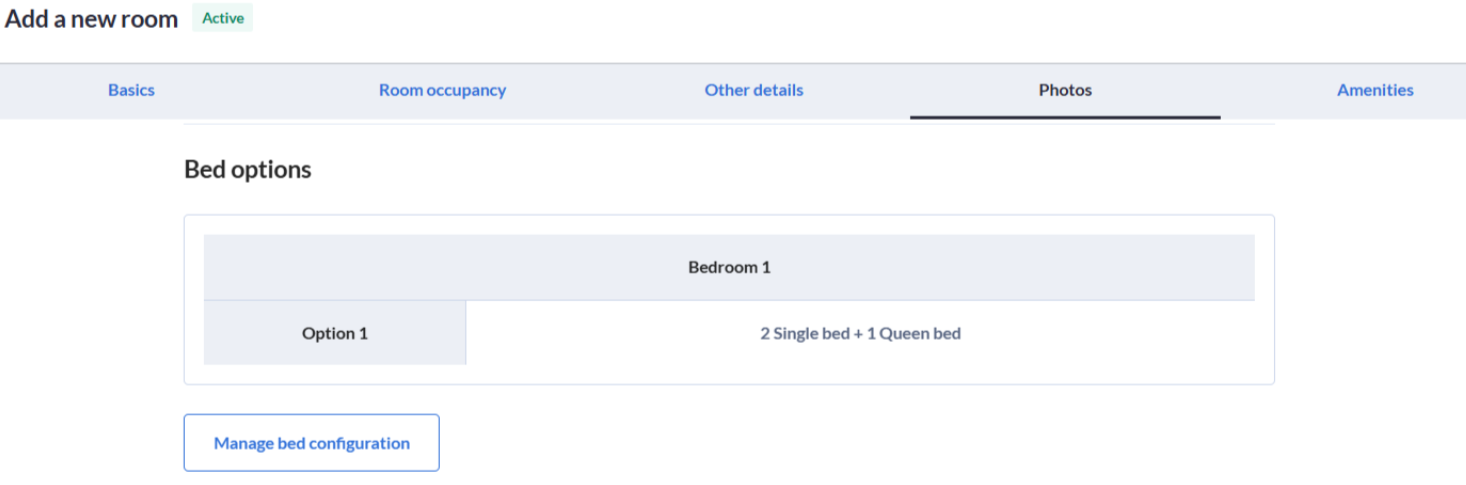
By default, the Room API does not split alternative configurations. As a result, if multiple bedding options are sent this way, they will be combined and reflected in Agoda Partner Portal as a single option (e.g., 2 Single Bed + 1 Queen Bed). Please see below screenshot:
Legacy Workarounds
If the OptionId feature is not enabled for your connection, you must use one of the following traditional workarounds to offer multiple bedding choices:
Partner to manually update the configurations directly in Agoda Partner Portal.
Partner to separate the inventory by creating distinct room types:
- Room 1: Deluxe - Queen Bed
- Room 2: Deluxe - Single Beds
Supporting Multiple Bedding Options
Channel Managers can now send distinct, alternative bedding configurations (e.g., Option 1: 1 King Bed OR Option 2: 2 Single Beds) by utilizing the new OptionId attribute within the
⚠️ Important: This advanced capability is disabled by default. Channel Managers must contact their Agoda Technical Account Manager to enable multiple bedding option support for their profile before utilizing OptionId.
<TPA_Extensions>
    <SubRooms>
        <SubRoom RoomType="BedRoom">
            <Amenities>
                <Amenity AmenityCode="1" Value="1" OptionId="1" />
                <Amenity AmenityCode="2" Value="2" OptionId="2" />
            </Amenities>
        </SubRoom>
    </SubRooms>
</TPA_Extensions>