

YCS API Error
Endpoint SetARI
Endpoint SetARIV2
Endpoint GetARI
Endpoint GetBookingList
Already hidden, moved and update in User Guide here instead https://developer.agoda.com/supply/update/docs/error-codes-1
Endpoint SetARI
| Error Code | Error Message | Description | Solution | Remark |
|---|---|---|---|---|
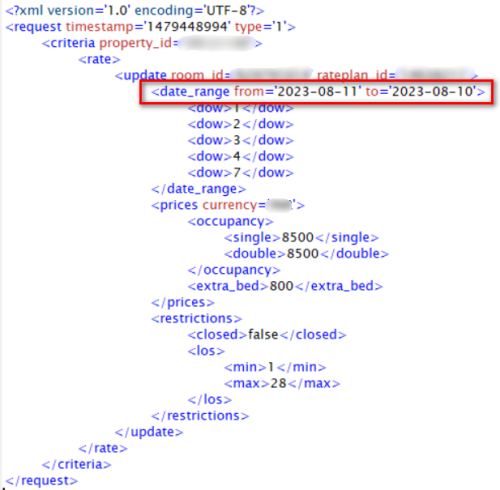
| 1101 | From date: %s cannot be later than To date: %s | Incorrect date input 'from' date is later than 'to' date | The channel manager needs to update the 'from' and 'to' dates in the request so that the 'to' date comes after the 'from' date. The 'to' date cannot be earlier than the 'from' date. | 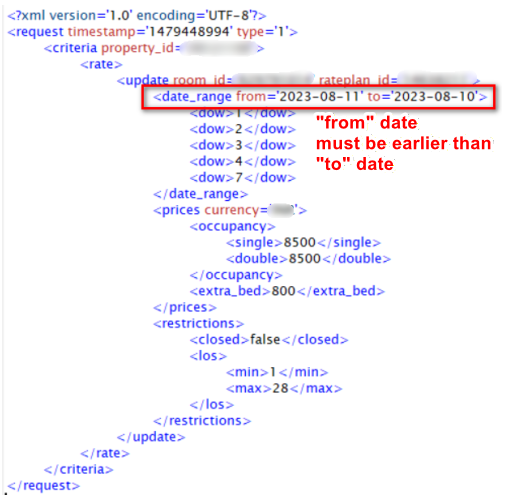 |
| 1201 | API key is not authorised for Property id: %s | API key is not authorized for this property | Submit a request to Agoda Accommodation Services Team ([email protected] ) to grant access for channel manager or property can select channel manager in YCS themselves. Property can follow the steps on how to connect Channel Manager here | |
| 1301 | Invalid Property id: %s | Property ID does not exist in Agoda | The property should double-check their Agoda Property ID. If they are unsure what their Agoda Property ID is, they can contact our support team through the YCS Help Widget for assistance. Property can follow the instruction on how to contact us via YCS here | |
| 1503 | Authentication failed: The supplied authentication is invalid | No API key input or incorrect API key format in requested URL. | Channel Manager should double-check the correctness of API key | |
| 1511 | [Line:<LINE_NUMBER> Column:<COLUMN_NUMBER>] <DESCRIPTION_OF_ERROR>] | This error occurs when there is a schema issue, such as a blank value, missing attributes, or incorrect input for certain fields (for example, missing currency, price, or allotment). | The channel manager should carefully review the XML message to ensure all required fields are correctly filled in before resubmitting the request. | |
| 1601 | The requested property (%s) has incorrect rate model | The property ID requested belongs to another supplier, not a YCS direct supply. | The property must register directly with Agoda before the channel manager can manage its ARI. | |
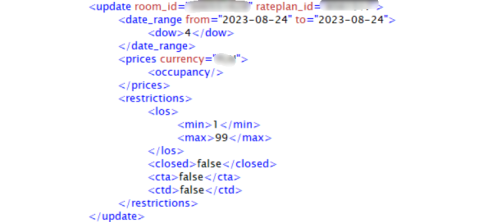
| 2101 | Default rate is required but does not exist | Price update are missing from the request | The channel manager must ensure that the XML request always includes a price update whenever <prices>,<prices> is present in the XML. If the channel manager only wants to update restrictions, please remove <prices>,<prices> from the XML request entirely. | 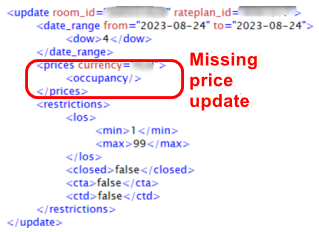 |
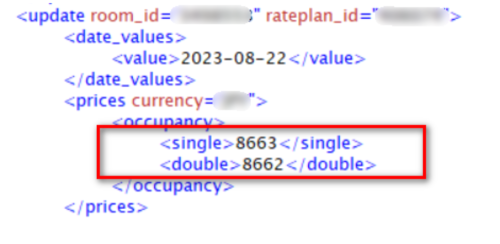
| 2102 | Single rate cannot be greater than Double rate | Single price cannot be higher than double rate price | Single rate must be lower or the same price as double rate. | 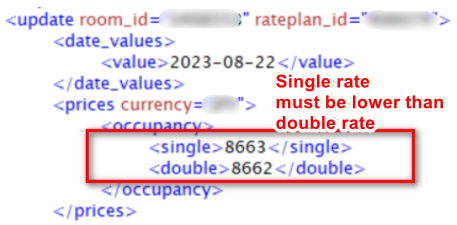 |
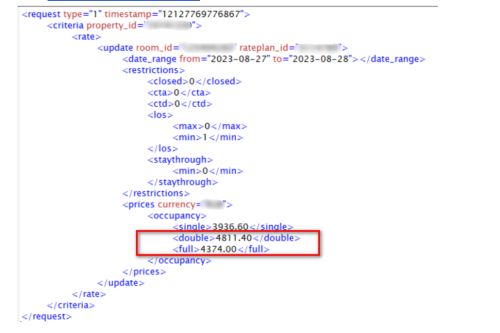
| 2103 | Double rate cannot be greater than Full rate | Double rate price cannot be higher than full rate price | double rate must be lower or the same price as full rate. | 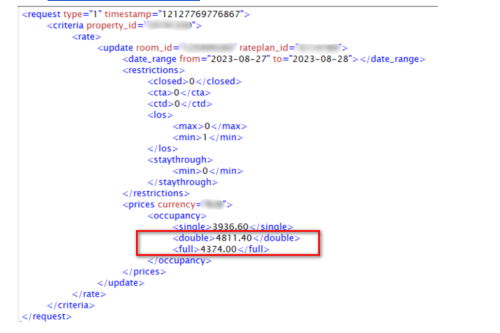 |
| 2105 | Invalid input for currency: %s | The requested currency in the request is invalid. | Please verify that the currency code follows the ISO standard. However, please note that some currencies may not be supported by Agoda. Kindly check with our support team for confirmation. | |
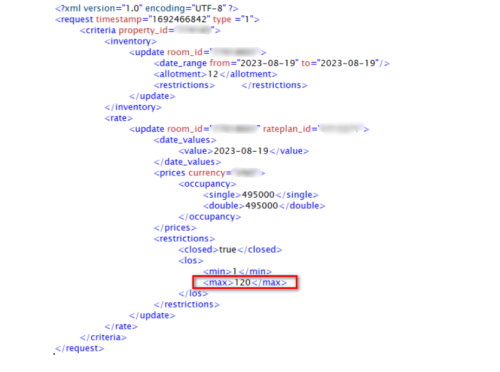
| 2106 | Max LOS: %s cannot be less than %s or greater than %s | Max LOS value in XML request is not supported by Agoda | Please verify the Max LOS value in the XML request. Agoda only supports a maximum LOS value between 0 and 99. | 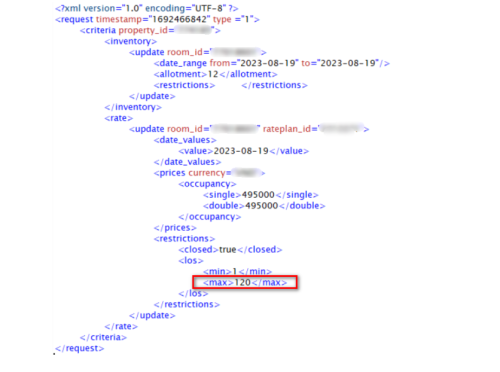 |
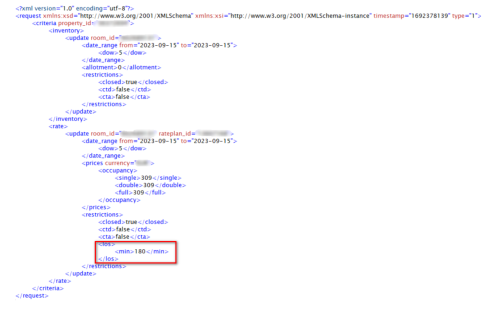
| 2107 | Min LOS: %s cannot be less than %s or greater than %s | Min LOS value in XML request is not supported by Agoda | Please verify the Min LOS value in the XML request. Agoda only supports a minimum LOS value between 0 and 99. | 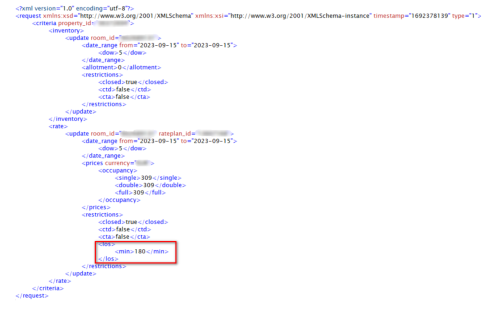 |
| 2109 | Max LOS: %s cannot be less than Min LOS: %s | Max LOS value cannot be equal to or less than existing Min LOS value in Agoda system. | Please verify that the Max LOS value is greater than the Min LOS value. Adjust the values accordingly in your system, then resend the update to Agoda. | |
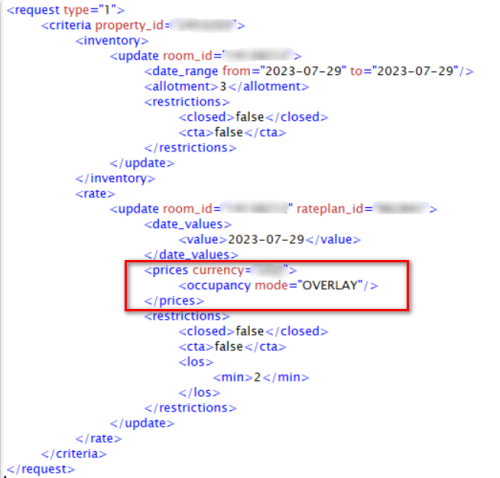
| 2112 | At least one occupancy rate must be set in OVERWRITE or OVERLAY mode | Price attributes are missing from the request with OVERWRITE or OVERLAY mode. | The Channel Manager must ensure that the XML request always includes valid price information when the <prices>,<prices> tag is present. If you intend to update restrictions only (without updating prices), please remove the <prices>,<prices> tag entirely from the XML request before resending. | 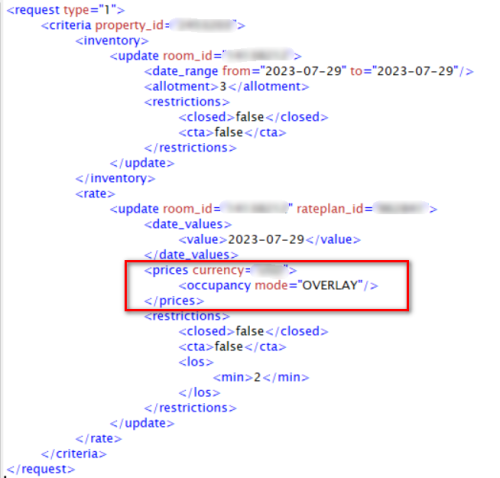 |
| 2201 | %s should be between %s and %s | Prices in the request are outside the min/max price limit at the country level set up on Agoda. | Please refer to error message returned and adjust price to be within min/max price range stated in the error. | |
| 2203 | Requested currency: %s does not match with Property currency: %s | Price update currency does not match currency set up in YCS | The Channel Manager can submit a request to the Agoda Accommodation Services Team at [email protected] to update the property’s currency in YCS on behalf of the property. Alternatively, the property can submit a currency update request directly via the Help Widget in YCS. Property can follow the instruction on how to contact us via YCS here | |
| 2204 | Price provided not sufficient for Max occupancy = %s, rate missing: %s | Occupancy Price update in the request is less than occupancy set up in YCS | The Channel Manager can implement a logic to always push price for all occupancy to Agoda *This error is only applicable to SetAriV1 (Full Occupancy Pricing) | |
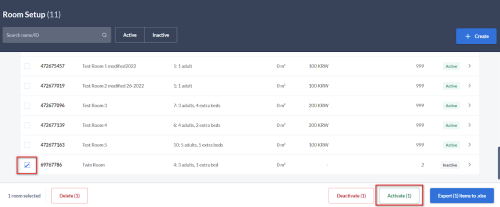
| 2205 | Room: %s does not exist for Property id: %s | Updates sent to room type which doesn’t exist or is inactive | Property can reactivate the room on YCS if it is inactive. How to reactivate room types in YCS:
|  |
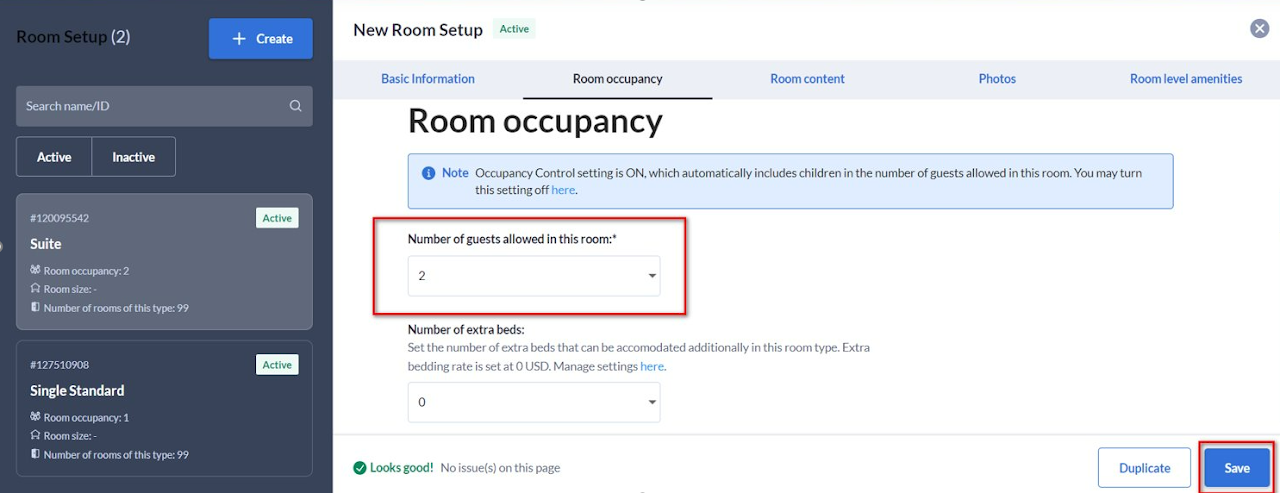
| 2206 | Cannot set %s because max occupancy is %s | Max Occupancy set up in YCS is less than price occupancy in the XML request | Property must align occupancy set up between YCS and channel manager How to update occupancy set up in YCS
|  |
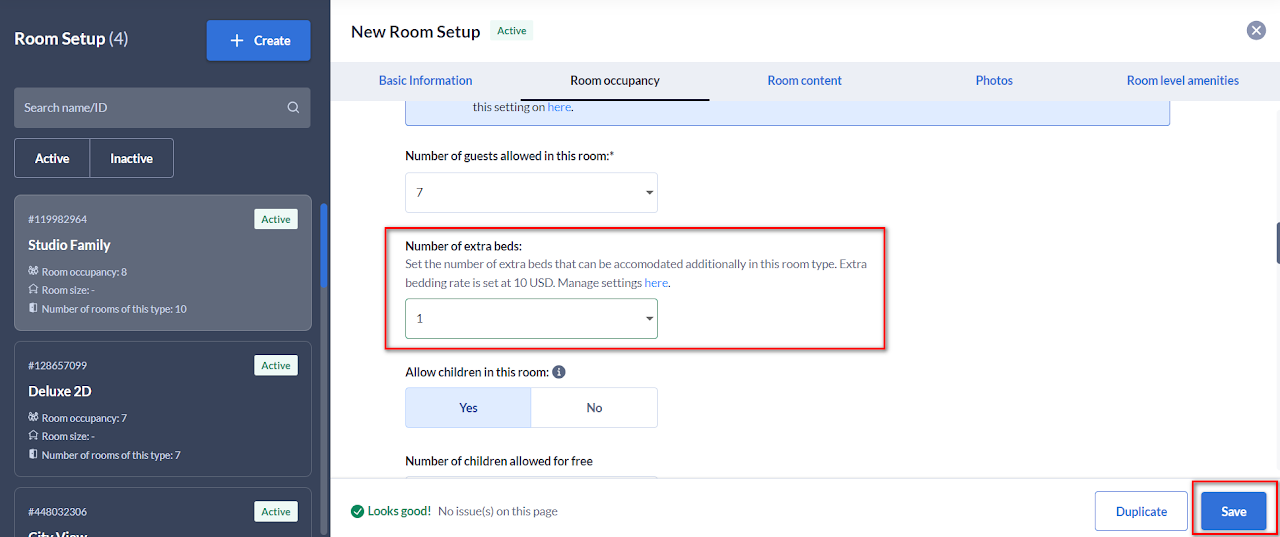
| 2208 | Max extrabed has not been set, You cannot set the extrabed rate | Updates sent has extra bed price but extra bed is not set for the room type in YCS | Property must set extra bed in YCS for the room type How to update extra bed for room types in YCS:
|  |
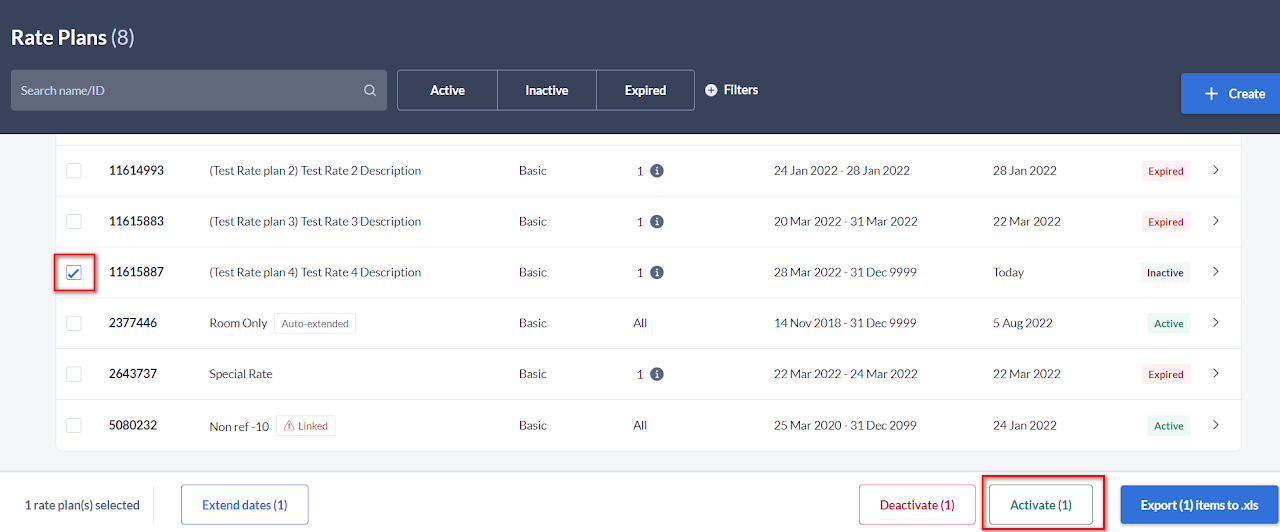
| 2209 | Rate plan: %s does not exist for Property id: %s | Updates sent to rate plan which doesn’t exist or is inactive | Property can reactivate the rate plan on YCS if it is inactive. How to reactivate rate plans in YCS:
|  |
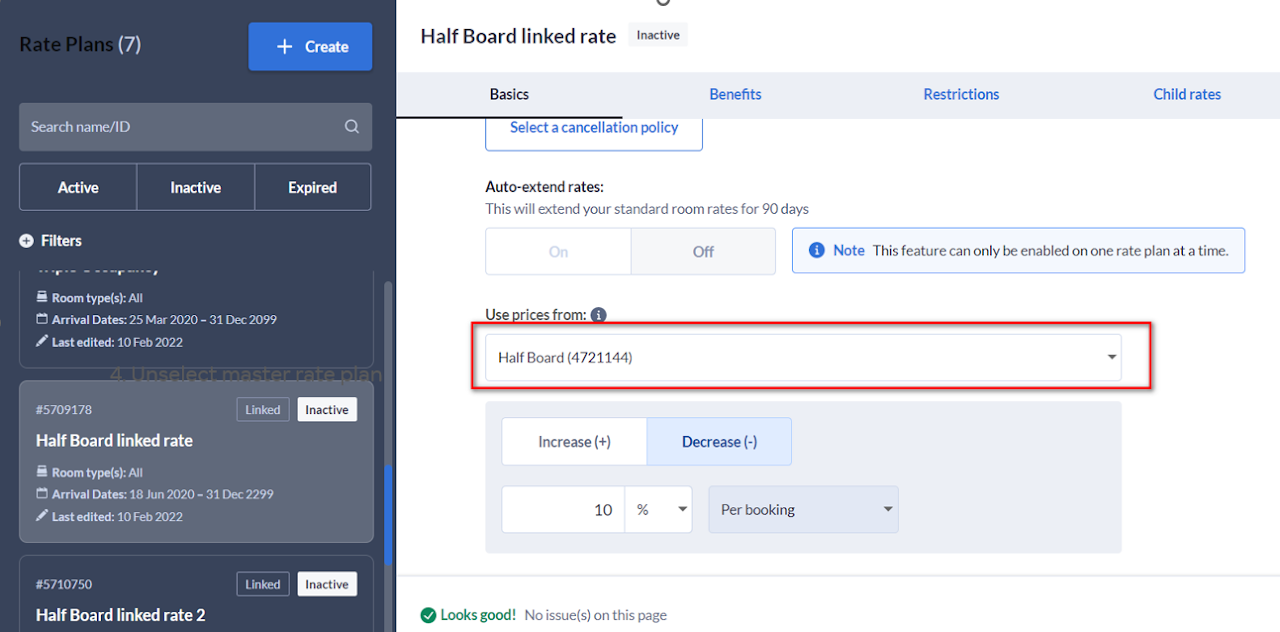
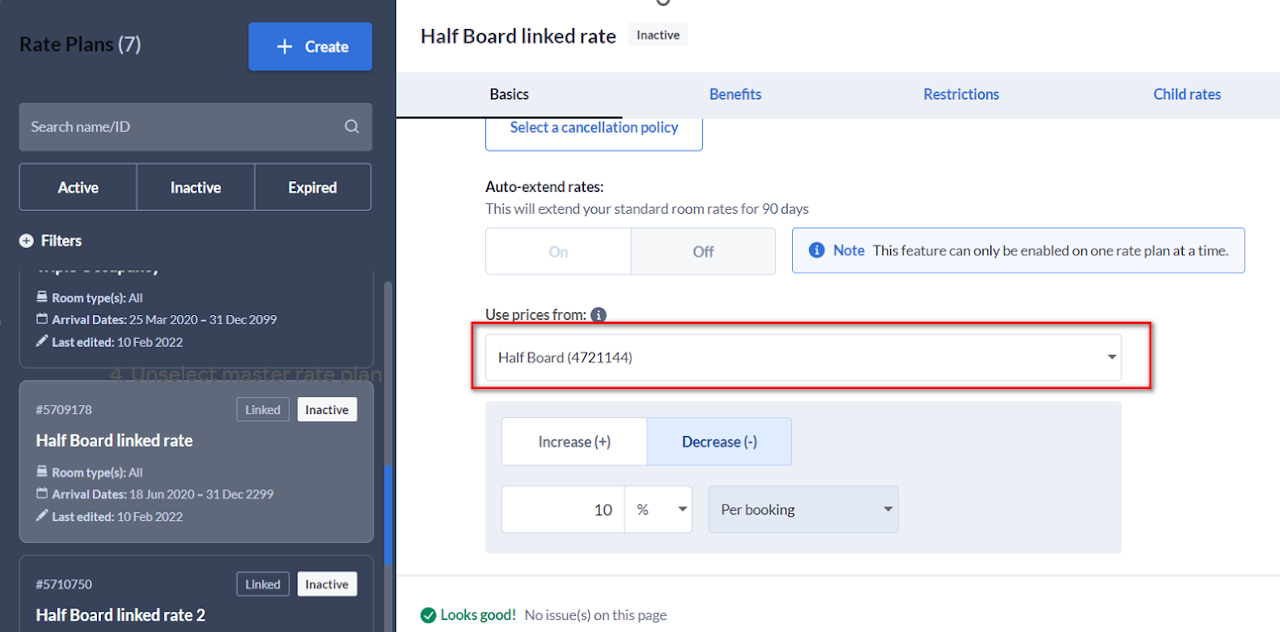
| 2210 | Rate plan: %s is child rate plan which is not allow to set rate | Rate update of child rate plan is not allowed | Property must unlink child rate plan from a master rate plan or unmap the child rate plan from channel manager How to unlink a child rate plan in YCS
|  |
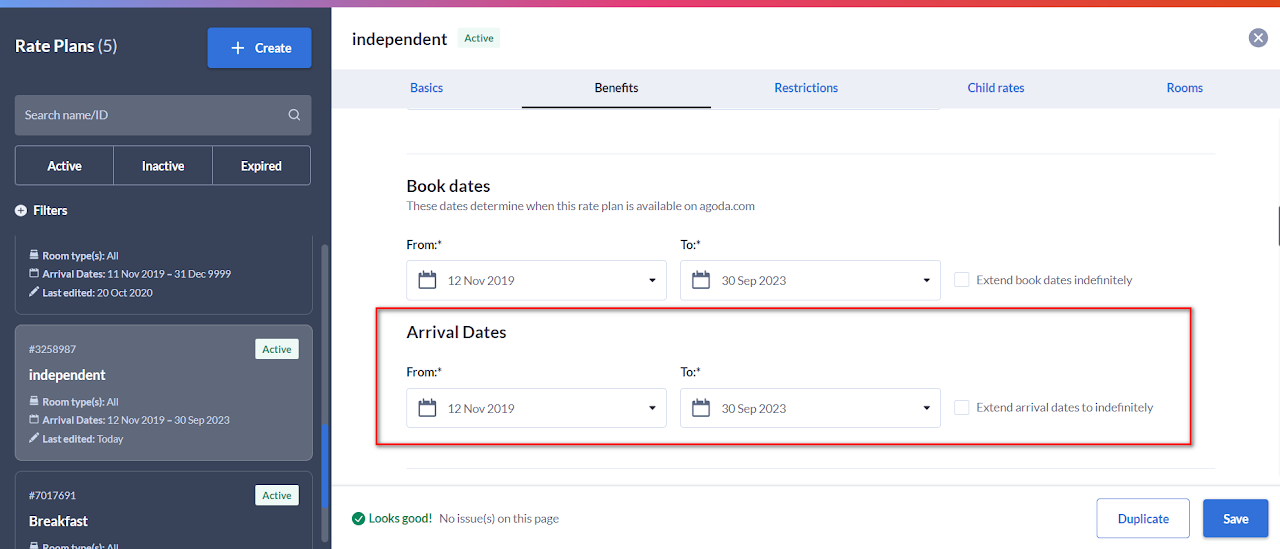
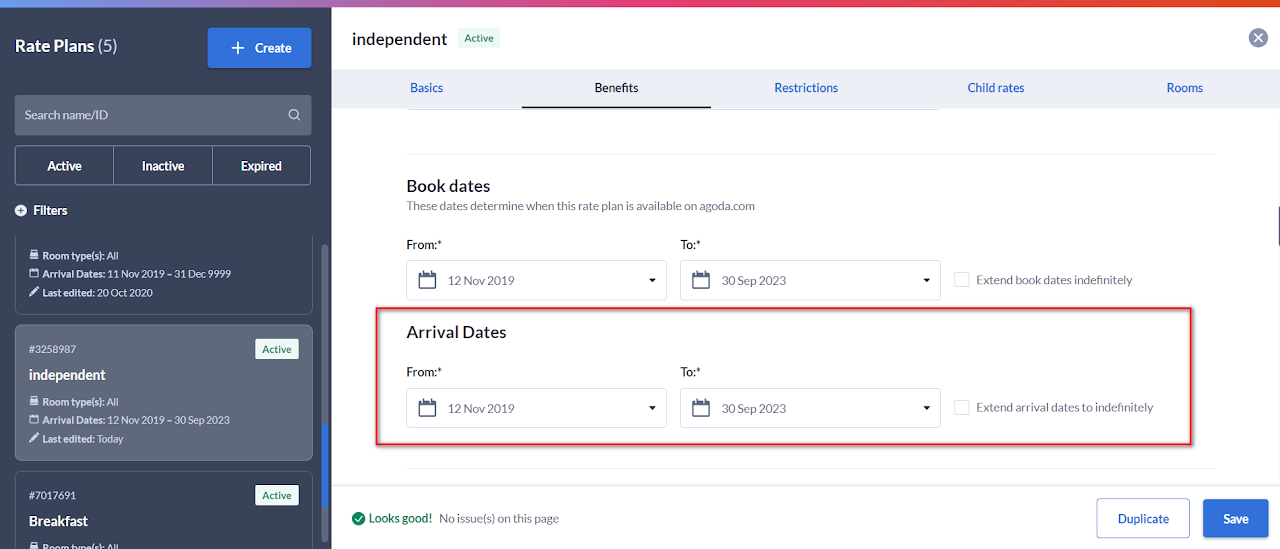
| 2211 | Rate: for ratePlanId: %s which is out of stay start/end period: (%s/%s) has not been set | Price update in XML request are for dates beyond arrival date range set up in YCS | Property must update arrival dates in YCS to cover dates pushed in the request How to update arrival date in YCS
|  |
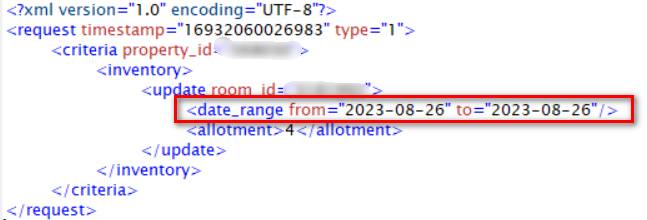
| 2213 | From date: %s cannot be earlier than yesterday | Requested 'from' date (date_range) in XML request more than 1 day in the past. | To support western timezone, Agoda allows update only today -1 Example here SetAri request was pushed to Agoda on 2023-08-28, however, the date requested was -2 days. Our system only allows -1 day | 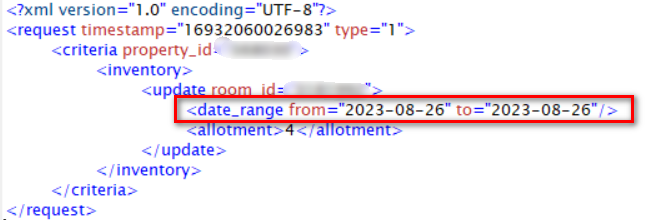 |
| 2214 | To date: %s cannot be earlier than yesterday | Requested 'to' date (date_range) in XML request more than 1 day in the past. | To support western timezone, Agoda allows update only today -1 | |
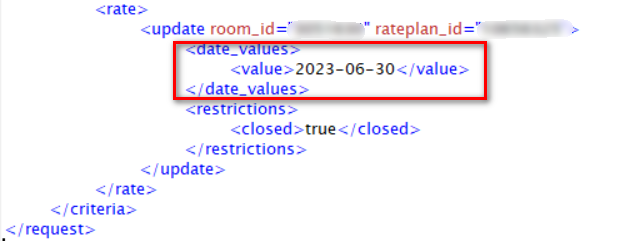
| 2215 | Date values cannot be earlier than yesterday | Requested date_values in XML request is more than 1 day in the past. | To support western timezone, Agoda allows update only today-1 Example here SetAri request was pushed to Agoda on 2023-08-17, however, the date requested was for June 2023. Our system only allows -1 day. | 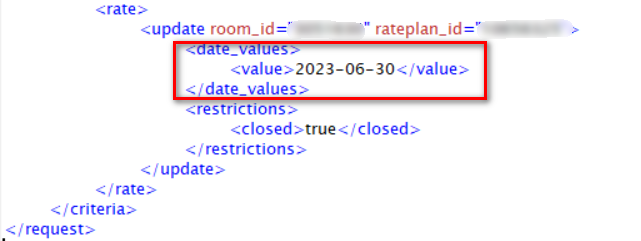 |
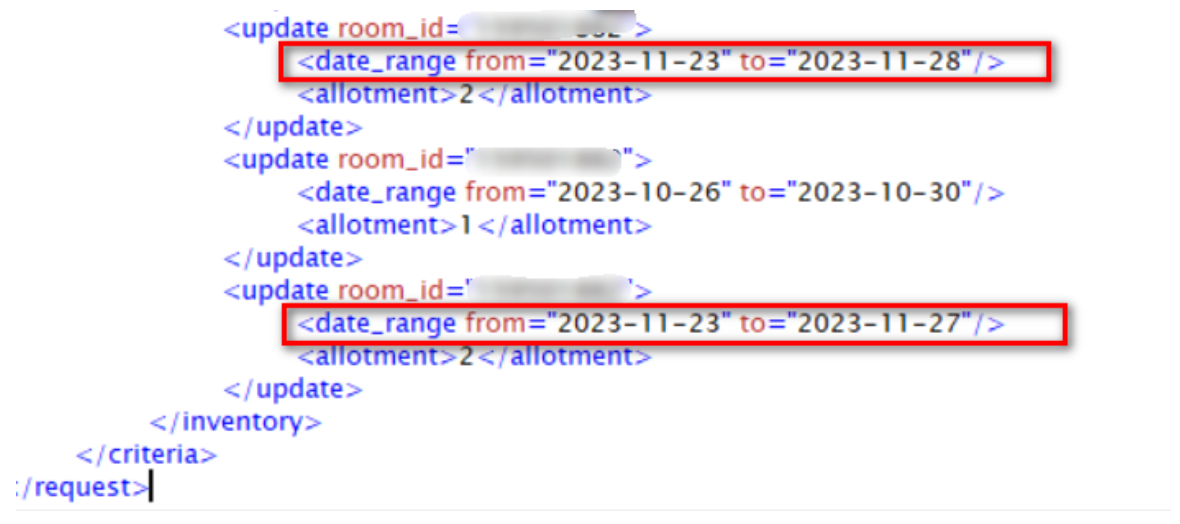
| 2217 | Error in Inventory Update - %s | Duplicate items in inventory updates. There's an overlapping conditions in the same request (room type ID + date) | Please revise XML request to make sure theres no overlapping conditions of inventory update. Here is an example of XML request that received this error. The request contains duplicate updates of the same room type ID with overlapping stay dates. The reason for this validation is to prevent different values for the same conditions being updated in our system. | 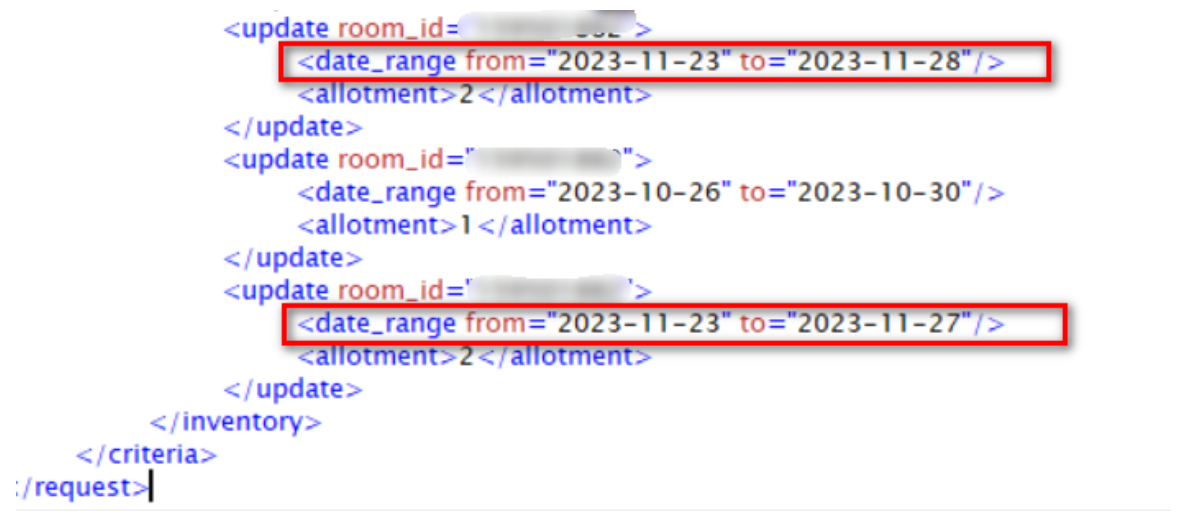 |
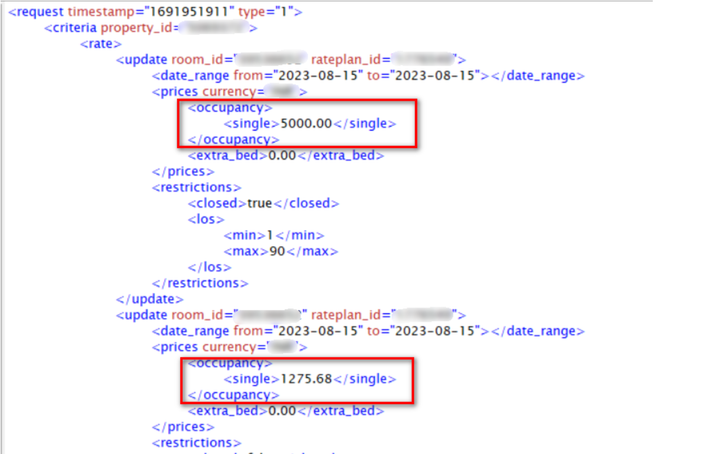
| 2218 | Error in Rates Update - %s | Duplicate items in rate updates. There's an overlapping conditions in the same request (room type ID/rate plan ID + date) | Please revise XML request to make sure theres no overlapping conditions of rate update. Example of XML request that received this error. The request contains duplicate updates of the same room type ID/rate plan ID with overlapping stay dates but with different price value. The reason for this validation is to prevent different values for the same conditions being updated in our system. | 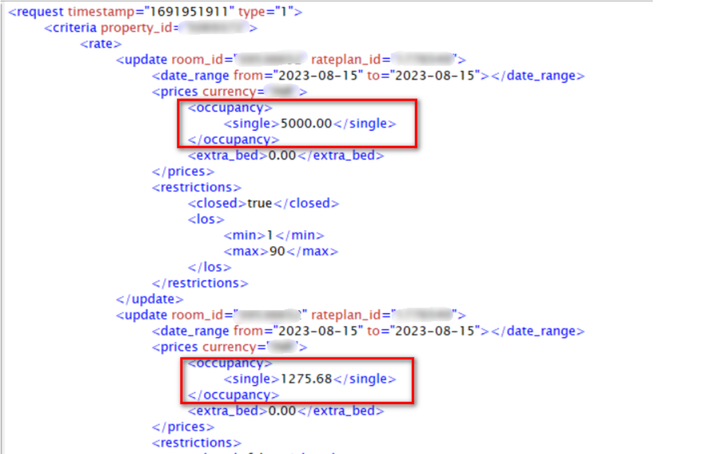 |
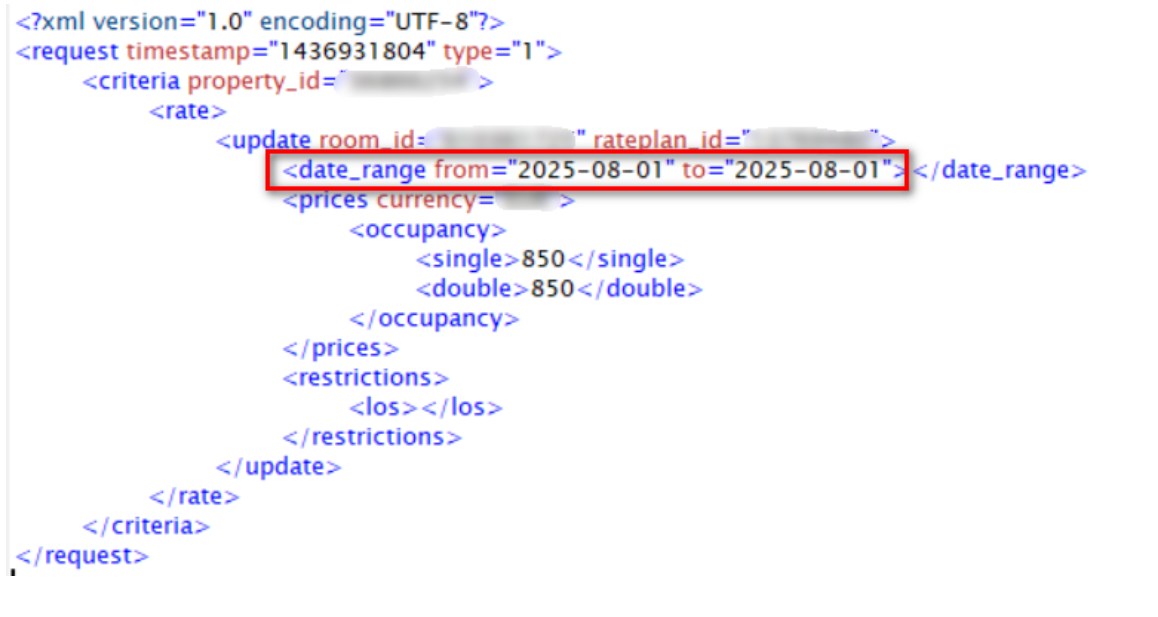
| 2219 | Date can not be greater than 730 days | Requested date in SetARI request is greater than 730 days (from today) | Agoda only allows updates 730 days in advance. Please kindly implement a validation to send updates not more than 730 days in advance. Example here request was pushed on 2023-08-01 but for date range 2025-08-01 which is 731 days in advance. | 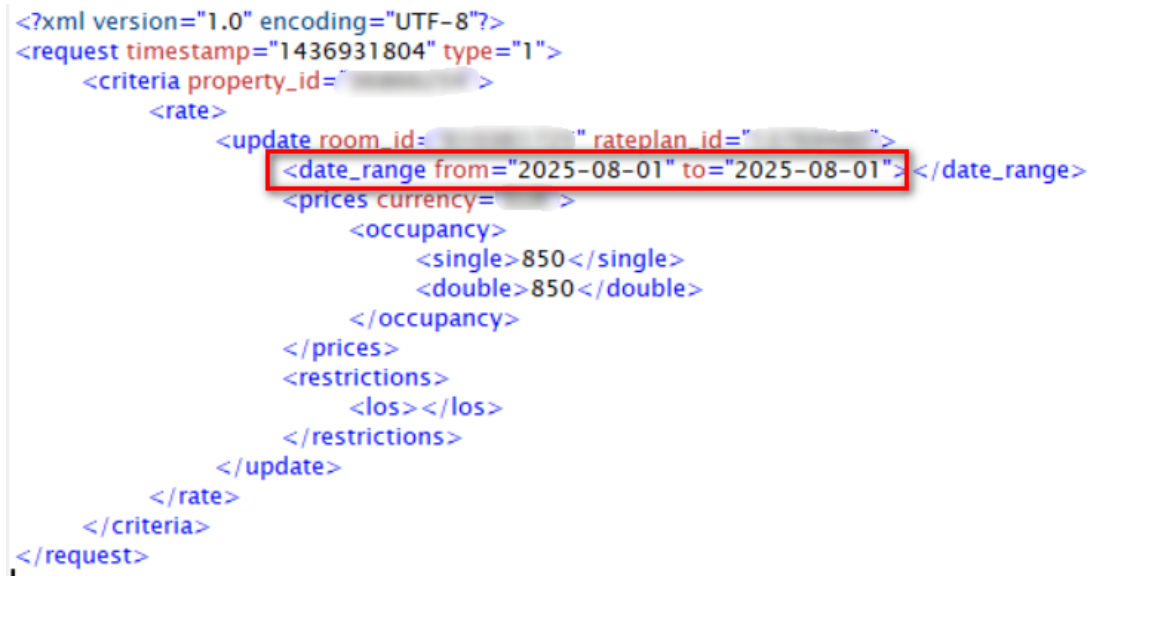 |
Endpoint SetARIV2
| Error Code | Error Message | Description | Solution | Remark |
|---|---|---|---|---|
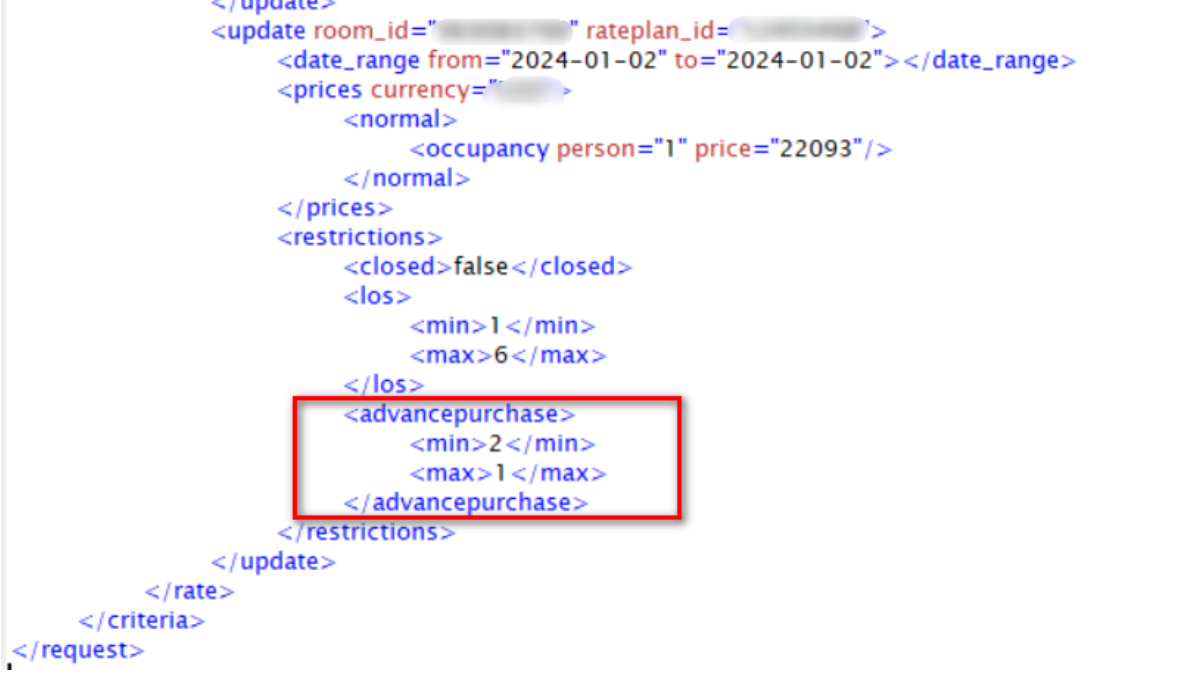
| 22017 | Max Advance Purchase cannot be less than Min Advance Purchase | Max Advance Purchase value in the XML request is lower than Min Advance Purchase Value. | Please kindly recheck XML request and adjust min/max advance purchase value | 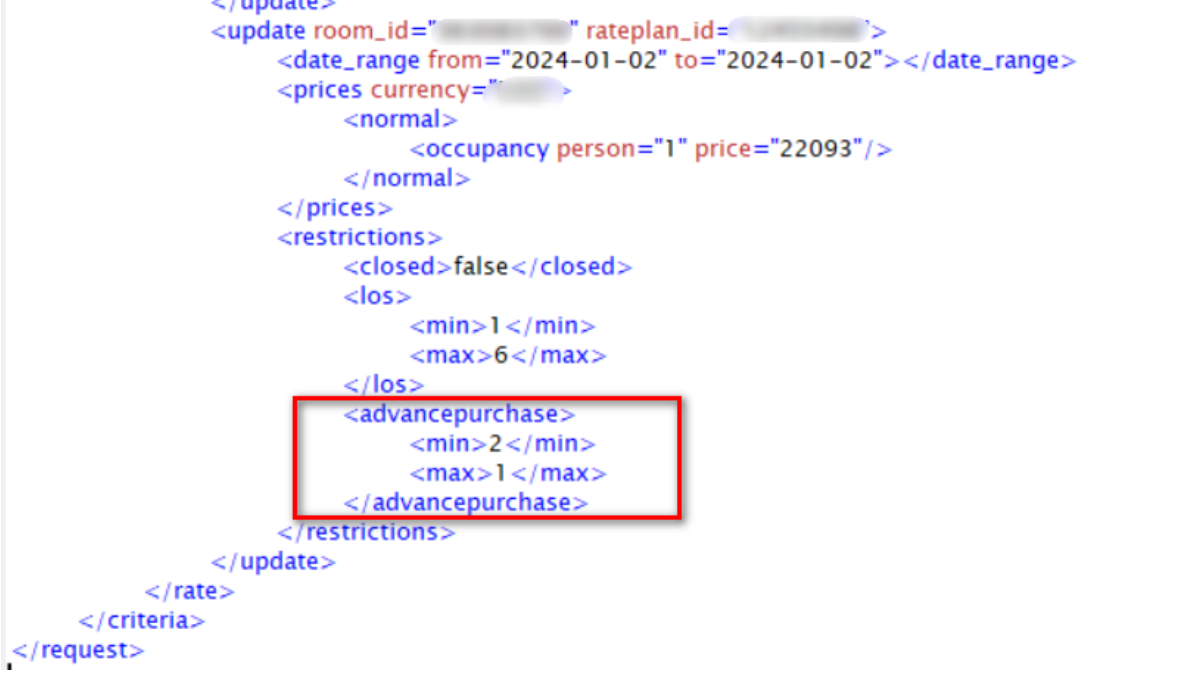 |
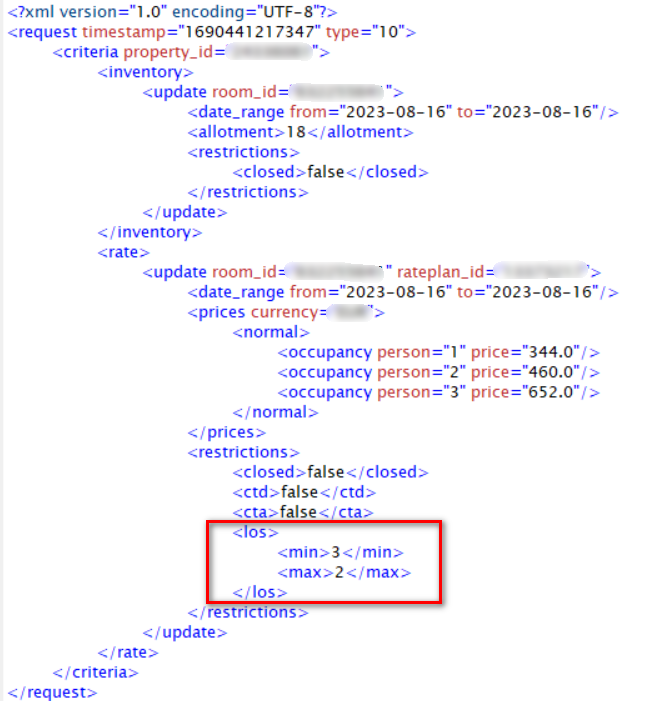
| 22210 | Max LOS cannot be less than Min Los | Max LOS value cannot be equal to or less than existing Min LOS value in Agoda system or in the same XML request | Please recheck min/max LOS value and repush again | 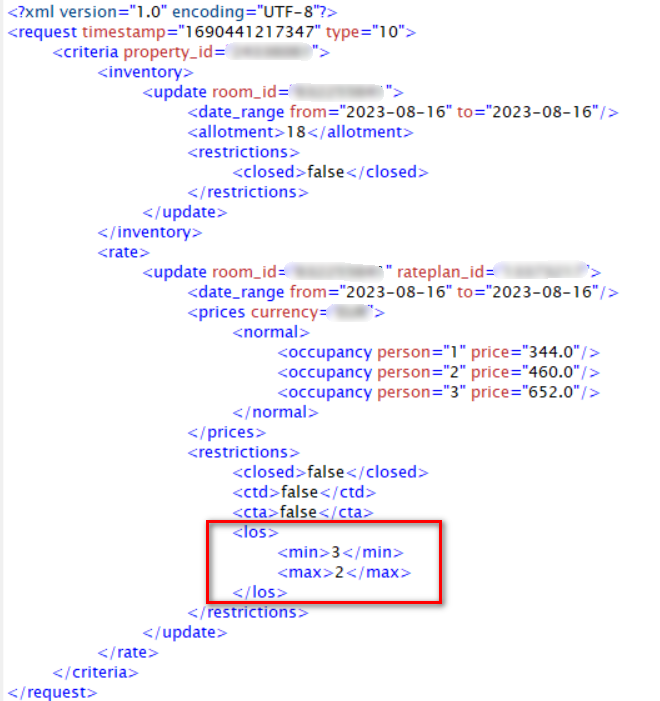 |
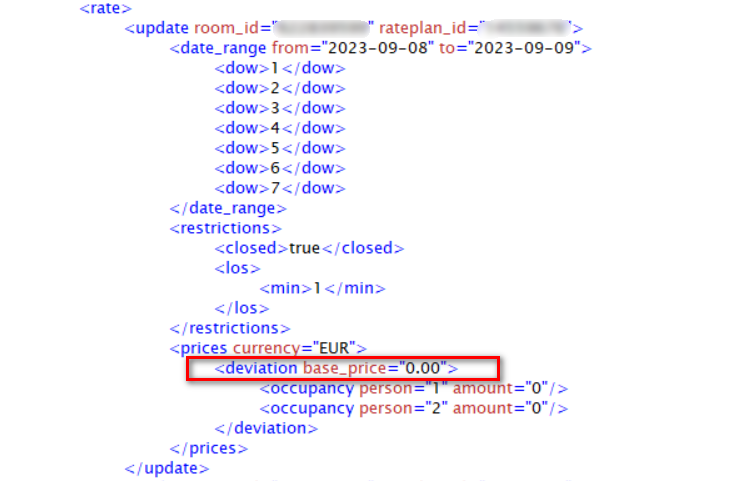
| 22216 | Base price: %s should be greater than %s | Base price pushed in SetAriV2 request (deviation mode) is outside min/max rate set up at country level on Agoda | Please recheck XML request | 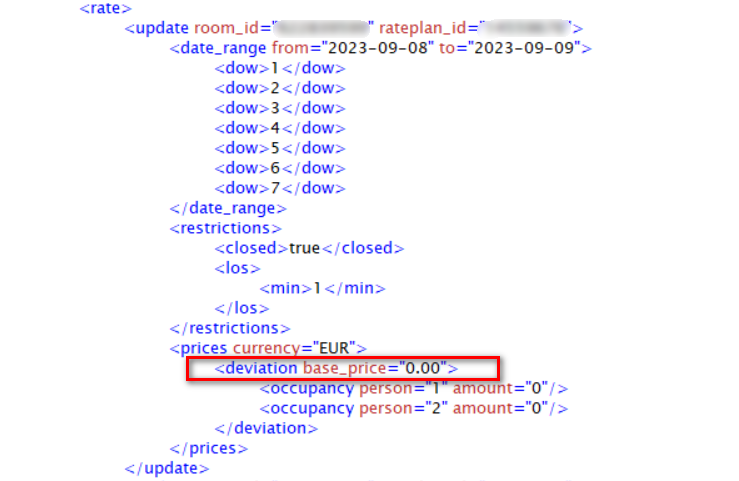 |
| 99101 | There was an internal server error: %s | Agoda internal server issue or outages | Please kindly contact Agoda Connectivity Support for further assistance Submit Technical Support Form here |
Endpoint GetARI
| Error Code | Error Message | Description | Solution | Remark |
|---|---|---|---|---|
| 1101 | From date: %s cannot be later than To date: %s | Incorrect date input 'from' date is later than 'to' date | Channel manager must revise 'from' and 'to' date in the request. 'To' date must be later, not before 'from' date |  |
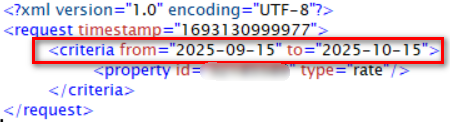
| 1102 | From date: %s cannot be earlier than yesterday and cannot be later than 730 days | Requested 'from' date in GetARI request is greater than 730 days (from today) or is more than 1 day in the past. | Agoda supports booking retrieval and updates only for dates ranging from 1 day before today (yesterday) up to 730 days (2 years) in the future. Any requests for dates outside this range will not be processed. Please ensure all date parameters fall within this window. For example, GetAriV2 request was queried on 2023-08-27 but requested for date range from="2025-09-15" to="2025-10-15" which is more than 730 days in advance. | 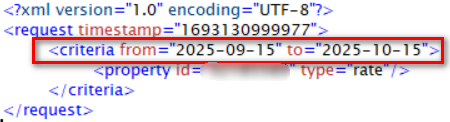 |
| 1103 | To date: %s cannot be earlier than yesterday and cannot be later than 730 days | Requested 'to' date in GetARI request is greater than 730 days (from today) or is more than 1 day in the past. | Agoda supports booking retrieval and updates only for dates ranging from 1 day before today (yesterday) up to 730 days (2 years) in the future. Any requests for dates outside this range will not be processed. Please ensure all date parameters fall within this window. For example, GetAriV2 request was queried on 2023-08-13 but requested for date range from="2023-08-11" to="2023-08-11" which is more than 1 day in the past. |  |
| 1201 | API key is not authorised for Property id: %s | API key is not authorized for this property | Submit a request to Agoda Accommodation Services Team ([email protected] ) to grant access for channel manager or property can select channel manager in YCS themselves Property can follow the instruction on how to connect Channel Manager here | |
| 1301 | Invalid Property id: %s | Property ID does not exist in Agoda | The property should double-check their Agoda Property ID. If they are unsure what their Agoda Property ID is, they can contact our support team through the YCS Help Widget for assistance. Property can follow the instruction on how to contact us via YCS here | |
| 1503 | Authentication failed: %s | No API key input or incorrect API key format in requested URL. | Please recheck the correctness of API key in the requested URL | |
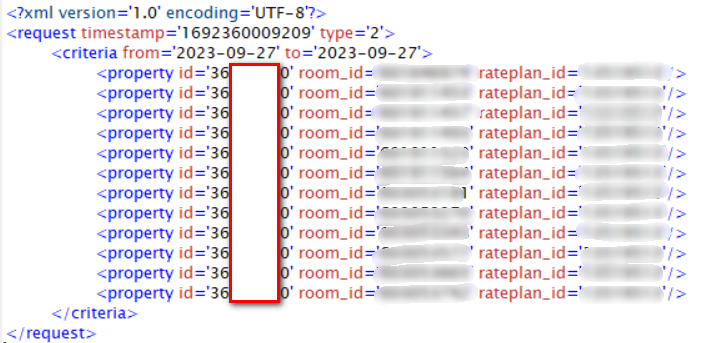
| 1506 | Property number has exceed the limit of 5 | Number of propperties in GetARI request is more than 5 properties | GetAriV1 and GetAriV2 can be used to retrieved ARI for not more than 5 properties in a single request. Please revise the request and retry again. Here is example of a request that received this error. Although property id is the same but the count is over 5. | 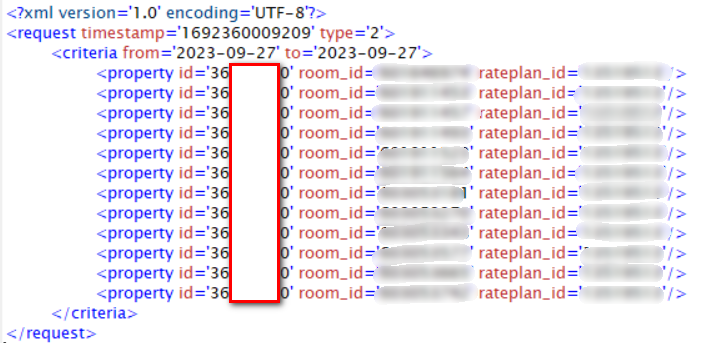 |
| 1511 | [Line:<LINE_NUMBER> Column:<COLUMN_NUMBER>] <DESCRIPTION_OF_ERROR>] | This error occurs when there is a schema issue, such as a blank value, missing attributes, or incorrect input for certain fields (for example, missing currency, price, or allotment). | The channel manager should carefully review the XML message to ensure all required fields are correctly filled in before resubmitting the request. | |
| 3101 | Date Range for GetARI cannot be longer than 31 days, %s days requested | GetARI requested dates are more than 31 stay dates. | Please limit each GetARI request to a maximum of 31 stay dates. If you need to retrieve ARI data for more than 31 days, split your queries into multiple GetARI requests, ensuring that each request covers no more than 31 stay dates. Additionally, stay dates must not be more than 730 days in advance from today. Here is example of GetARI request with date criteria more than 31 day count. |  |
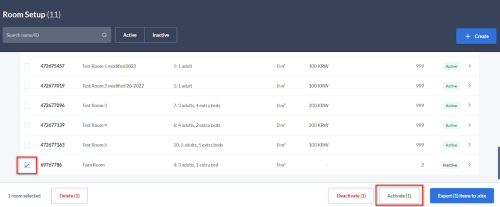
| 3102 | Room: %s does not exist for Property id: %s | GetARI request for room type ID which doesn’t exist or is inactive | Property can reactivate the room on YCS if it is inactive. How to reactivate room types in YCS:
|  |
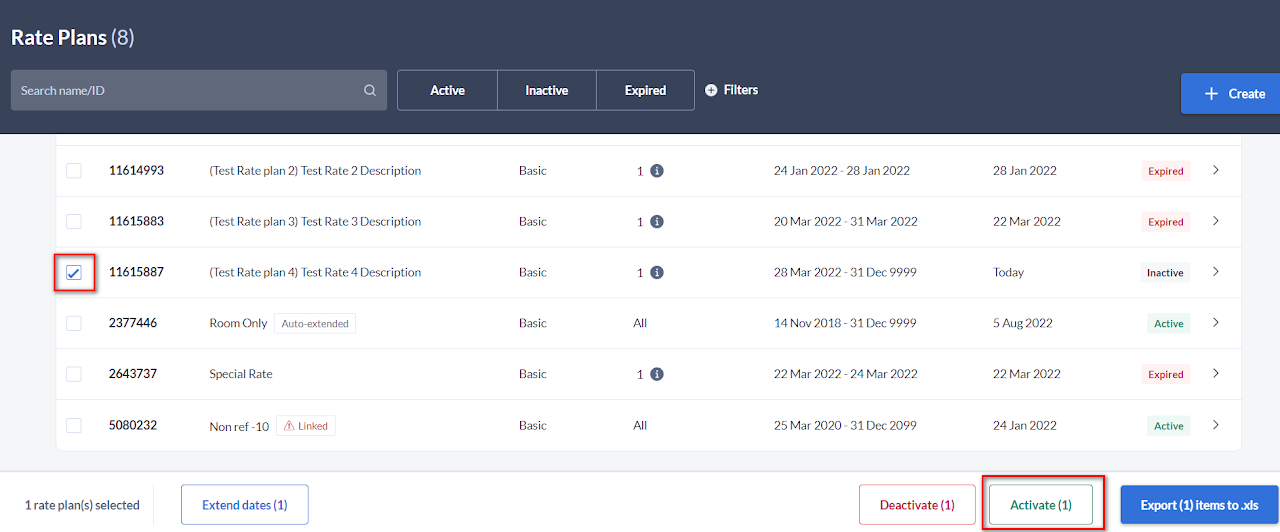
| 3103 | Rate plan: %s does not exist for Property id: %s | GetARI request for rate plan ID which doesn’t exist or is inactive | Property can reactivate the rate plan on YCS if it is inactive. How to reactivate rate plans in YCS:
|  |
| 99101 | There was an internal server error: %s | Agoda internal server issue or outages | Please kindly contact Agoda Connectivity Support for further assistance or retry again later Submit Technical Support Form here |
Endpoint GetBookingList
| Error Code | Error Message | Description | Solution | Remark | |
|---|---|---|---|---|---|
| 1101 | From date: %s cannot be later than To date: %s | Incorrect date input 'from' date is later than 'to' date | Channel manager must revise 'from' and 'to' date in the request. 'To' date must be later, not before 'from' date |  |
GetBookingListV1
| Error Code | Error Message | Description | Solution | Remark |
|---|---|---|---|---|
| 4101 | From date: %s cannot be older than 740 days | Requested dates in GetBookingListV1 is older than 740 days in the past | Please limit GetBookingList date/time criteria not more than 740 days in the past. Example of GetBookingListV1 request with date/time criteria over 740 days from queried date (2023-07-27) |  |
| 4102 | Date Range for GetBookingList cannot be longer than 90 days, %s days requested | GetBookingList requested date range are more than 90 days. | Please limit GetBookingList request to retrieve bookings not more than 90 days in a single request. If channel manager would like to retreive bookings for more than 90 days, please breakdown queries into multiple GetBookingList requests but for date range not older than 740 days in the past. Example of GetBookingListV1 request with date criteria more than 90 day count. |  |
| 4103 | Timezone defined in 'From' and 'To' must be the same | Time zone of 'from' and 'to' date range are different. | Please recheck GetBookingListV1 request again and retry with the same time zone for both 'from' and 'to' date range. Example of GetBookingListV1 request with date criteria more than 90 day count. |  |
GetBookingListV2
| Error Code | Error Message | Description | Solution | Remark |
|---|---|---|---|---|
| 11101 | From date: %s cannot be older than 740 days | Requested dates in GetBookingListV2 is older than 740 days in the past | Please limit GetBookingListV2 date/time criteria not more than 740 days in the past. Example of GetBookingListV2 request with date/time criteria over 740 days from queried date (2023-08-21) |  |
| 11105 | Time Range for GetBookingListV2 cannot be longer than 60 minutes, around %s minutes requested | Requested time range in GetBookingListV2 is more than 60 minutes | Please limit GetBookingListV2 date/time range criteria not more than 60 minutes in a single request Example of GetBookingListV2 request with date/time criteria over 60 minutes (60 minutes and 1 second) |  |
GetBookingList and GetBookingDetails
| Error Code | Error Message | Description | Solution | Remark |
|---|---|---|---|---|
| 1201 | API key is not authorised for Property id: %s | API key is not authorized for this property | Submit a request to Agoda Accommodation Services Team ([email protected] ) to grant access for channel manager or property can select channel manager in YCS themselves Property can follow the instruction on how to connect Channel Manager here | |
| 1503 | Authentication failed: %s | No API key input or incorrect API key format in requested URL. | Please recheck the correctness of API key in the requested URL | |
| 1511 | [Line:<LINE_NUMBER> Column:<COLUMN_NUMBER>] <DESCRIPTION_OF_ERROR>] | This error occurs when there is a schema issue, such as a blank value, missing attributes, or incorrect input for certain fields (for example, missing currency, price, or allotment). | The channel manager should carefully review the XML message to ensure all required fields are correctly filled in before resubmitting the request. | |
| 99101 | There was an internal server error: %s | Agoda internal server issue or outages | Please kindly contact Agoda Connectivity Support for further assistance or retry again later Submit Technical Support Form here |
To remove
Endpoints |
Error Code |
Error Message |
Description |
Solution |
Remarks |
| SetARI | 1101 | From date: %s cannot be later than To date: %s | Incorrect date input 'from' date is later than 'to' date | The channel manager needs to update the 'from' and 'to' dates in the request so that the 'to' date comes after the 'from' date. The 'to' date cannot be earlier than the 'from' date. |
Example of incorrect request
|
| SetARI | 1201 | API key is not authorised for Property id: %s | API key is not authorized for this property | Submit a request to Agoda Accommodation Services Team ([email protected]) to grant access for channel manager or property can select channel manager in YCS themselves | Property can follow the instruction on how to connect Channel Manager here |
| SetARI | 1301 | Invalid Property id: %s | Property ID does not exist in Agoda | The property should double-check their Agoda Property ID. If they are unsure what their Agoda Property ID is, they can contact our support team through the YCS Help Widget for assistance. | Property can follow the instruction on how to contact us via YCS here |
| SetARI | 1503 | Authentication failed: The supplied authentication is invalid | No API key input or incorrect API key format in requested URL. | Channel Manager should double-check the correctness of API key | |
| SetARI | 1511 | [Line:<LINE_NUMBER> Column:<COLUMN_NUMBER>] <DESCRIPTION_OF_ERROR>] | This error occurs when there is a schema issue, such as a blank value, missing attributes, or incorrect input for certain fields (for example, missing currency, price, or allotment). | The channel manager should carefully review the XML message to ensure all required fields are correctly filled in before resubmitting the request. | |
| SetARI | 1601 | The requested property (%s) has incorrect rate model | The property ID requested belongs to another supplier, not a YCS direct supply. | The property must register directly with Agoda before the channel manager can manage its ARI. | |
| SetARI | 2101 | Default rate is required but does not exist | Price update are missing from the request | The channel manager must ensure that the XML request always includes a price update whenever <prices>,</prices> is present in the XML. If the channel manager only wants to update restrictions, please remove <prices>,</prices> from the XML request entirely. | Example of incorrect request
 |
| SetARI | 2102 | Single rate cannot be greater than Double rate | Single price cannot be higher than double rate price | Single rate must be lower or the same price as double rate. | Example of incorrect request
 |
| SetARI | 2103 | Double rate cannot be greater than Full rate | Double rate price cannot be higher than full rate price | double rate must be lower or the same price as full rate. | Example of incorrect request
 |
| SetARI | 2105 | Invalid input for currency: %s | The requested currency in the request is invalid. | Please verify that the currency code follows the ISO standard. However, please note that some currencies may not be supported by Agoda. Kindly check with our support team for confirmation. | |
| SetARI | 2106 | Max LOS: %s cannot be less than %s or greater than %s | Max LOS value in XML request is not supported by Agoda | Please verify the Max LOS value in the XML request. Agoda only supports a maximum LOS value between 0 and 99. | Example of incorrect request
 |
| SetARI | 2107 | Min LOS: %s cannot be less than %s or greater than %s | Min LOS value in XML request is not supported by Agoda | Please verify the Min LOS value in the XML request. Agoda only supports a minimum LOS value between 0 and 99. | Example of incorrect request
 |
| SetARI | 2109 | Max LOS: %s cannot be less than Min LOS: %s | Max LOS value cannot be equal to or less than existing Min LOS value in Agoda system. | Please verify that the Max LOS value is greater than the Min LOS value. Adjust the values accordingly in your system, then resend the update to Agoda. | |
| SetARI | 2112 | At least one occupancy rate must be set in OVERWRITE or OVERLAY mode | Price attributes are missing from the request with OVERWRITE or OVERLAY mode. | The Channel Manager must ensure that the XML request always includes valid price information when the <prices>,</prices> tag is present. If you intend to update restrictions only (without updating prices), please remove the <prices>,</prices> tag entirely from the XML request before resending. | Example of incorrect request
 |
| SetARI | 2201 | %s should be between %s and %s | Prices in the request are outside the min/max price limit at the country level set up on Agoda. | Please refer to error message returned and adjust price to be within min/max price range stated in the error. | |
| SetARI | 2203 | Requested currency: %s does not match with Property currency: %s | Price update currency does not match currency set up in YCS | The Channel Manager can submit a request to the Agoda Accommodation Services Team at [email protected] to update the property’s currency in YCS on behalf of the property. Alternatively, the property can submit a currency update request directly via the Help Widget in YCS. | Property can follow the instruction on how to contact us via YCS here |
| SetARI | 2204 | Price provided not sufficient for Max occupancy = %s, rate missing: %s | Occupancy Price update in the request is less than occupancy set up in YCS | The Channel Manager can implement a logic to always push price for all occupancy to Agoda |
*This error is only applicable to SetAriV1 (Full Occupancy Pricing)
Examples
|
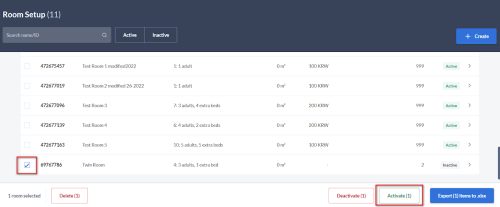
| SetARI | 2205 | Room: %s does not exist for Property id: %s | Updates sent to room type which doesn’t exist or is inactive | Property can reactivate the room on YCS if it is inactive. |
How to reactivate room types in YCS:
 |
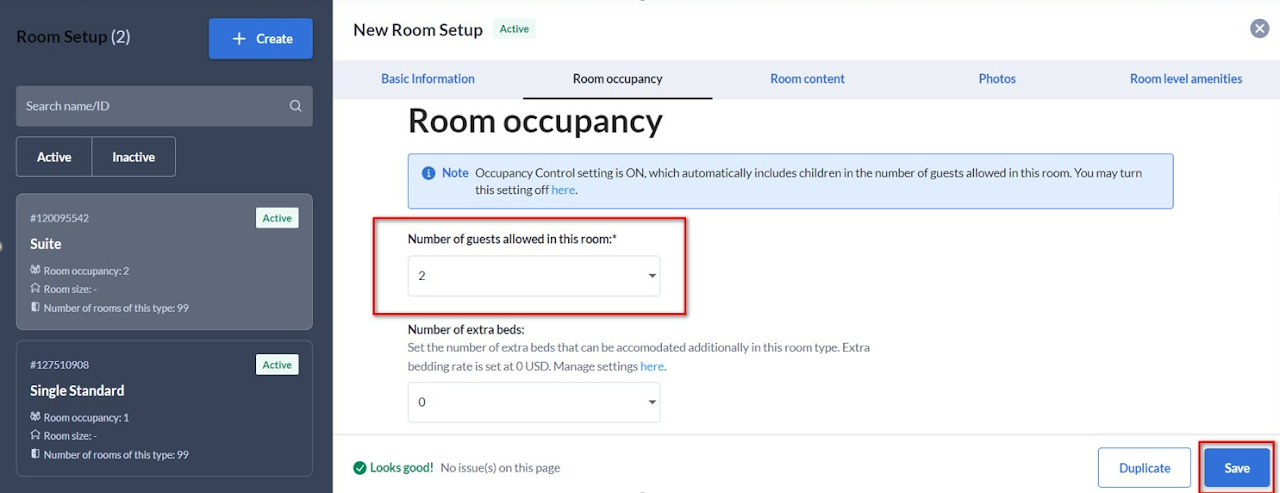
| SetARI | 2206 | Cannot set %s because max occupancy is %s | Max Occupancy set up in YCS is less than price occupancy in the XML request | Property must align occupancy set up between YCS and channel manager |
How to update occupancy set up in YCS
 |
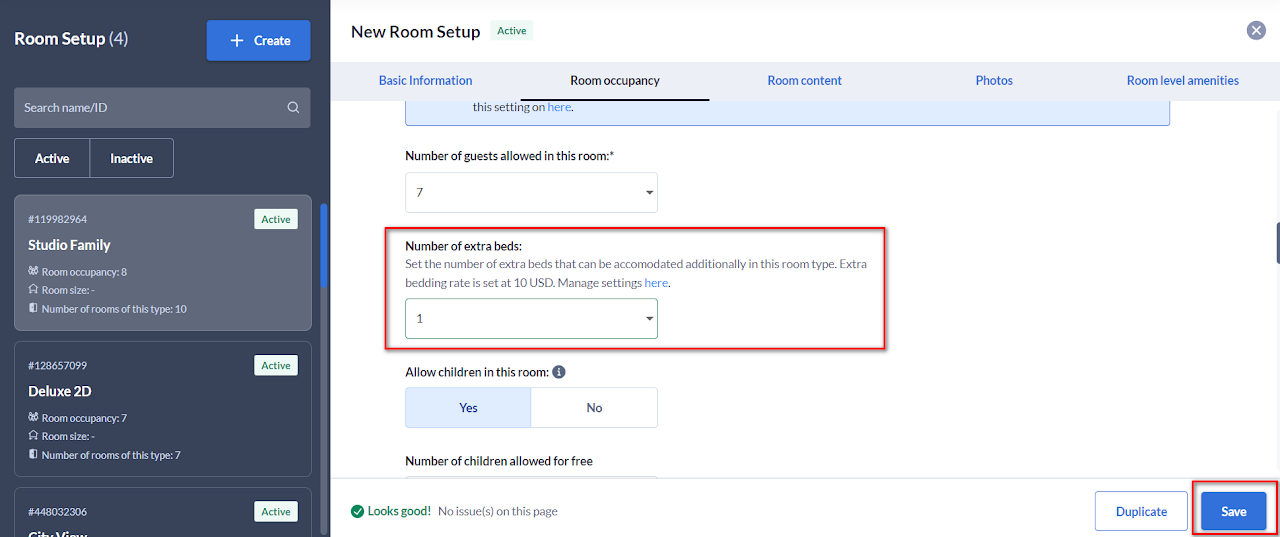
| SetARI | 2208 | Max extrabed has not been set, You cannot set the extrabed rate | Updates sent has extra bed price but extra bed is not set for the room type in YCS | Property must set extra bed in YCS for the room type |
How to update extra bed for room types in YCS:
 |
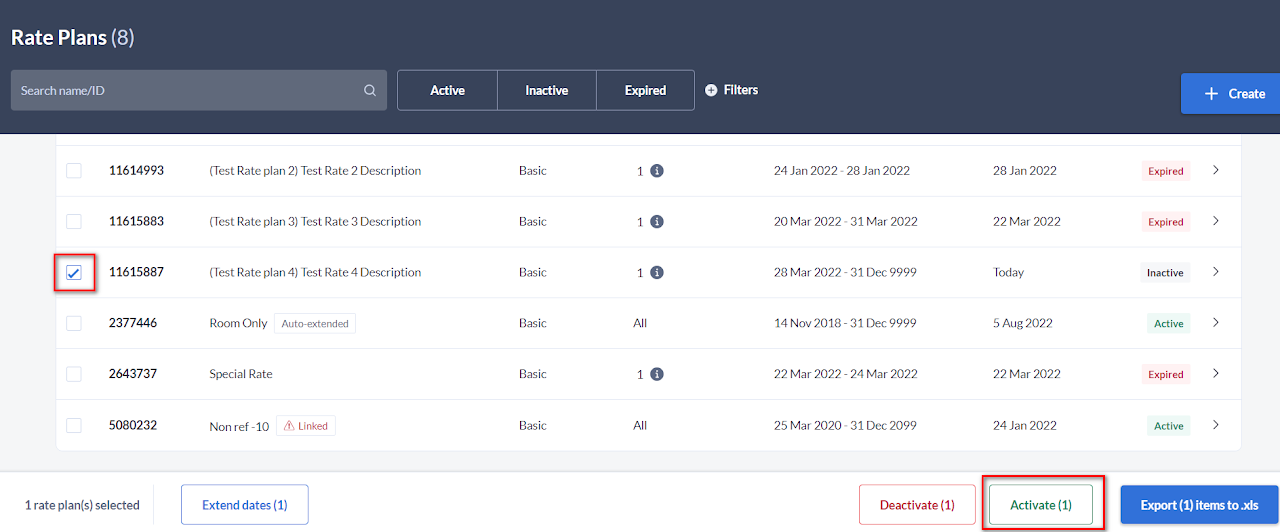
| SetARI | 2209 | Rate plan: %s does not exist for Property id: %s | Updates sent to rate plan which doesn’t exist or is inactive | Property can reactivate the rate plan on YCS if it is inactive. |
How to reactivate rate plans in YCS:
 |
| SetARI | 2210 | Rate plan: %s is child rate plan which is not allow to set rate | Rate update of child rate plan is not allowed | Property must unlink child rate plan from a master rate plan or unmap the child rate plan from channel manager |
How to unlink a child rate plan in YCS
 |
| SetARI | 2211 | Rate: for ratePlanId: %s which is out of stay start/end period: (%s/%s) has not been set | Price update in XML request are for dates beyond arrival date range set up in YCS | Property must update arrival dates in YCS to cover dates pushed in the request |
How to update arrival date in YCS
 |
| SetARI | 2213 | From date: %s cannot be earlier than yesterday | Requested 'from' date (date_range) in XML request more than 1 day in the past. | To support western timezone, Agoda allows update only today -1 | Below SetAri request was pushed to Agoda on 2023-08-28, however, the date requested was -2 days. Our system only allows -1 day
|
| SetARI | 2214 | To date: %s cannot be earlier than yesterday | Requested 'to' date (date_range) in XML request more than 1 day in the past. | To support western timezone, Agoda allows update only today -1 | |
| SetARI | 2215 | Date values cannot be earlier than yesterday | Requested date_values in XML request is more than 1 day in the past. | To support western timezone, Agoda allows update only today-1 | Below SetAri request was pushed to Agoda on 2023-08-17, however, the date requested was for June 2023. Our system only allows -1 day.
|
| SetARI | 2217 | Error in Inventory Update - %s | Duplicate items in inventory updates. There's an overlapping conditions in the same request (room type ID + date) | Please revise XML request to make sure theres no overlapping conditions of inventory update. | Below is an example of XML request that received this error. The request contains duplicate updates of the same room type ID with overlapping stay dates. The reason for this validation is to prevent different values for the same conditions being updated in our system.
|
| SetARI | 2218 | Error in Rates Update - %s | Duplicate items in rate updates. There's an overlapping conditions in the same request (room type ID/rate plan ID + date) | Please revise XML request to make sure theres no overlapping conditions of rate update. | Below is an example of XML request that received this error. The request contains duplicate updates of the same room type ID/rate plan ID with overlapping stay dates but with different price value.
The reason for this validation is to prevent different values for the same conditions being updated in our system.
|
| SetARI | 2219 | Date can not be greater than 730 days | Requested date in SetARI request is greater than 730 days (from today) | Agoda only allows updates 730 days in advance. Please kindly implement a validation to send updates not more than 730 days in advance. | Below request was pushed on 2023-08-01 but for date range 2025-08-01 which is 731 days in advance.
|
| SetARIV2 | 22017 | Max Advance Purchase cannot be less than Min Advance Purchase | Max Advance Purchase value in the XML request is lower than Min Advance Purchase Value. | Please kindly recheck XML request and adjust min/max advance purchase value | Example of incorrect request
|
| SetARIV2 | 22210 | Max LOS cannot be less than Min Los | Max LOS value cannot be equal to or less than existing Min LOS value in Agoda system or in the same XML request | Please recheck min/max LOS value and repush again | Example of incorrect request
 |
| SetARIV2 | 22216 | Base price: %s should be greater than %s | Base price pushed in SetAriV2 request (deviation mode) is outside min/max rate set up at country level on Agoda | Please recheck XML request | Example of incorrect request
 |
| SetARIV2 | 99101 | There was an internal server error: %s | Agoda internal server issue or outages | Please kindly contact Agoda Connectivity Support for further assistance | Submit Technical Support Form here |
| GetARI | 1101 | From date: %s cannot be later than To date: %s | Incorrect date input 'from' date is later than 'to' date | Channel manager must revise 'from' and 'to' date in the request. 'To' date must be later, not before 'from' date | Example of incorrect request
 |
| GetARI | 1102 | From date: %s cannot be earlier than yesterday and cannot be later than 730 days | Requested 'from' date in GetARI request is greater than 730 days (from today) or is more than 1 day in the past. | Agoda supports booking retrieval and updates only for dates ranging from 1 day before today (yesterday) up to 730 days (2 years) in the future. Any requests for dates outside this range will not be processed. Please ensure all date parameters fall within this window. | For example, below GetAriV2 request was queried on 2023-08-27 but requested for date range from="2025-09-15" to="2025-10-15" which is more than 730 days in advance.
 |
| GetARI | 1103 | To date: %s cannot be earlier than yesterday and cannot be later than 730 days | Requested 'to' date in GetARI request is greater than 730 days (from today) or is more than 1 day in the past. | Agoda supports booking retrieval and updates only for dates ranging from 1 day before today (yesterday) up to 730 days (2 years) in the future. Any requests for dates outside this range will not be processed. Please ensure all date parameters fall within this window. | For example, below GetAriV2 request was queried on 2023-08-13 but requested for date range from="2023-08-11" to="2023-08-11" which is more than 1 day in the past.
 |
| GetARI | 1201 | API key is not authorised for Property id: %s | API key is not authorized for this property | Submit a request to Agoda Accommodation Services Team ([email protected]) to grant access for channel manager or property can select channel manager in YCS themselves | Property can follow the instruction on how to connect Channel Manager here |
| GetARI | 1301 | Invalid Property id: %s | Property ID does not exist in Agoda | The property should double-check their Agoda Property ID. If they are unsure what their Agoda Property ID is, they can contact our support team through the YCS Help Widget for assistance. | Property can follow the instruction on how to contact us via YCS here |
| GetARI | 1503 | Authentication failed: %s | No API key input or incorrect API key format in requested URL. | Please recheck the correctness of API key in the requested URL | |
| GetARI | 1506 | Property number has exceed the limit of 5 | Number of propperties in GetARI request is more than 5 properties | GetAriV1 and GetAriV2 can be used to retrieved ARI for not more than 5 properties in a single request. Please revise the request and retry again. | Below is an example of a request that receieved this error. Although property id is the same but the count is over 5.
 |
| GetARI | 1511 | [Line:<LINE_NUMBER> Column:<COLUMN_NUMBER>] <DESCRIPTION_OF_ERROR>] | This error occurs when there is a schema issue, such as a blank value, missing attributes, or incorrect input for certain fields (for example, missing currency, price, or allotment). | The channel manager should carefully review the XML message to ensure all required fields are correctly filled in before resubmitting the request. | |
| GetARI | 3101 | Date Range for GetARI cannot be longer than 31 days, %s days requested | GetARI requested dates are more than 31 stay dates. | Please limit each GetARI request to a maximum of 31 stay dates. If you need to retrieve ARI data for more than 31 days, split your queries into multiple GetARI requests, ensuring that each request covers no more than 31 stay dates. Additionally, stay dates must not be more than 730 days in advance from today. | Below is an example of GetARI request with date criteria more than 31 day count.
 |
| GetARI | 3102 | Room: %s does not exist for Property id: %s | GetARI request for room type ID which doesn’t exist or is inactive | Property can reactivate the room on YCS if it is inactive. |
How to reactivate room types in YCS:
|
| GetARI | 3103 | Rate plan: %s does not exist for Property id: %s | GetARI request for rate plan ID which doesn’t exist or is inactive | Property can reactivate the rate plan on YCS if it is inactive. |
How to reactivate rate plans in YCS:
|
| GetARI | 99101 | There was an internal server error: %s | Agoda internal server issue or outages | Please kindly contact Agoda Connectivity Support for further assistance or retry again later | Submit Technical Support Form here | GetBookingList | 1101 | From date: %s cannot be later than To date: %s | Incorrect date input 'from' date is later than 'to' date | Channel manager must revise 'from' and 'to' date in the request. 'To' date must be later, not before 'from' date | Example of incorrect request
|
| GetBookingList and GetBookingDetails | 1201 | API key is not authorised for Property id: %s | API key is not authorized for this property | Submit a request to Agoda Accommodation Services Team ([email protected]) to grant access for channel manager or property can select channel manager in YCS themselves | Property can follow the instruction on how to connect Channel Manager here |
| GetBookingList and GetBookingDetails | 1503 | Authentication failed: %s | No API key input or incorrect API key format in requested URL. | Please recheck the correctness of API key in the requested URL | |
| GetBookingList and GetBookingDetails | 1511 | [Line:<LINE_NUMBER> Column:<COLUMN_NUMBER>] <DESCRIPTION_OF_ERROR>] | This error occurs when there is a schema issue, such as a blank value, missing attributes, or incorrect input for certain fields (for example, missing currency, price, or allotment). | The channel manager should carefully review the XML message to ensure all required fields are correctly filled in before resubmitting the request. | |
| GetBookingListV1 | 4101 | From date: %s cannot be older than 740 days | Requested dates in GetBookingListV1 is older than 740 days in the past | Please limit GetBookingList date/time criteria not more than 740 days in the past. | Below is an example of GetBookingListV1 request with date/time criteria over 740 days from queried date (2023-07-27)
 |
| GetBookingListV1 | 4102 | Date Range for GetBookingList cannot be longer than 90 days, %s days requested | GetBookingList requested date range are more than 90 days. | Please limit GetBookingList request to retrieve bookings not more than 90 days in a single request. If channel manager would like to retreive bookings for more than 90 days, please breakdown queries into multiple GetBookingList requests but for date range not older than 740 days in the past. | Below is an example of GetBookingListV1 request with date criteria more than 90 day count.
 |
| GetBookingListV1 | 4103 | Timezone defined in 'From' and 'To' must be the same | Time zone of 'from' and 'to' date range are different. | Please recheck GetBookingListV1 request again and retry with the same time zone for both 'from' and 'to' date range. | Below is an example of GetBookingListV1 request with date criteria more than 90 day count.
 |
| GetBookingListV2 | 11101 | From date: %s cannot be older than 740 days | Requested dates in GetBookingListV2 is older than 740 days in the past | Please limit GetBookingListV2 date/time criteria not more than 740 days in the past. | Below is an example of GetBookingListV2 request with date/time criteria over 740 days from queried date (2023-08-21)
 |
| GetBookingListV2 | 11105 | Time Range for GetBookingListV2 cannot be longer than 60 minutes, around %s minutes requested | Requested time range in GetBookingListV2 is more than 60 minutes | Please limit GetBookingListV2 date/time range criteria not more than 60 minutes in a single request | Below is an example of GetBookingListV2 request with date/time criteria over 60 minutes (60 minutes and 1 second)
 |
| GetBookingList and GetBookingDetails | 99101 | There was an internal server error: %s | Agoda internal server issue or outages | Please kindly contact Agoda Connectivity Support for further assistance or retry again later | Submit Technical Support Form here |